


Adobe GoLive How-To: Intro to Using Cascading Style Sheets



Total Training has many more titles like this one. Click here to learn more.
When the time comes to make full-scale changes to your Web site, you’ll count your blessings that you learned how to use Cascading Styles Sheets (CSS) early. Style Sheets give you the flexibility and power to make fast changes with just a few mouse clicks and keystrokes. But the real benefit is in establishing style consistency across all pages of your Web site.
If you are already familiar with paragraph and character styles in page layout applications you’ll understand the basics of CSS. But CSS goes beyond modifying fonts, sizes, and colors. CSS can be used to position elements, not merely text, on a page.
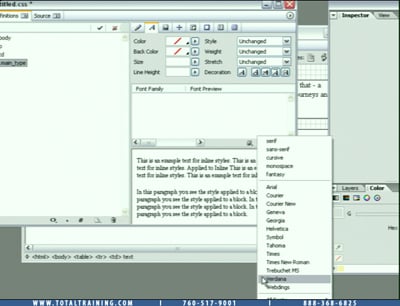
In this video clip (4 minutes 46 seconds as a 8.5 MB download), Steve Holmes shows you how to access the CSS Editor. From there you’ll create a new Class Style Sheet; customize a font for the style sheet; and save the style sheet for future use.
In the full “Total Training presents: The Essentials of Adobe GoLive® CS” training series, you will learn web site creation, smart objects, layout tricks, FTP publishing, and more.
This video tutorial is a QuickTime movie. Click this link “GoLive CSS Introduction” to play the movie. Or you can download the file by option- or right clicking on the link and saving the “.mov” file to your hard disk.
If you do not have QuickTime installed, you can get it here:

Excerpted from “Total Training presents: The Essentials of Adobe GoLive® CS” © 2004 Total Training ALL RIGHTS RESERVED.
This article was last modified on January 8, 2023
This article was first published on February 11, 2005
Commenting is easier and faster when you're logged in!

Recommended for you

Free PatternMaker Plug-in for InDesign
You can download the PatternMaker plug-in for InDesign free from TeacupSoftware....
Why Is InDesign Soooo Slow?
Experiencing a slow-down in InDesign? Here are seven reasons it might be happeni...
Chartwell Font Updated
In 2011, type designer Travis Kochel devised a very clever method of creating ch...