



Ordinarily features planned for future versions of software are closely guarded secrets. Just remember the arsenal of lawyers who swooped down on several Web sites last summer when screen shots of Photoshop 6 were posted.
However, in a move that has raised eyebrows, the InDesign team has begun revealing technologies that may or may not appear in future versions of Adobe Systems’ page layout program InDesign.
On February 3, 2001 a message appeared on the InDesign list hosted by blueworld.com that directs people to a report located here.
The site shows new transparency technologies that are planned for future versions of Adobe InDesign. For those who do not speak French, the site shows the following:
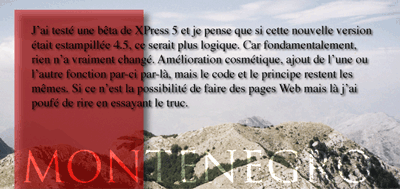
The first image (MONTENEGRO) simulates how text in InDesign will have transparency assigned as well as blending modes to make the text react with InDesign elements as well as imported graphics. The image also shows how text can also have drop shadows and glows applied while retaining full editability.

The second image (airplane) simulates how transparency and shadows can be applied to InDesign objects as well as EPS vector objects imported from Adobe Illustrator or bitmap files (TIFF, EPS, PSD).

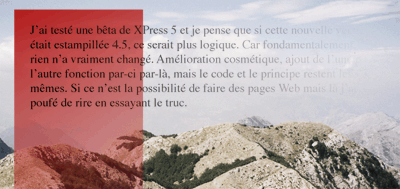
IMPORTANT NOTE: The third and fourth images DO NOT show features planned for the next version of InDesign. Rather they show a suggestion for further enhancements to transparency–to add a layer mask or opacity mask to the transparency features. This would allow gradients applied to text to fade along the gradient. These two images should not be taken as showing features planned for InDesign 2.0.
Shortly after the message appeared on the Blueworld list, David Evans of Adobe Systems posted the following explanation: “Starting last week, we began publicly demonstrating some new technologies that we are working on for InDesign around support for transparency. We haven’t made any product announcements of any kind, especially in terms of specific features, version numbers, or dates of availability.”
“Adobe is very committed to the development of InDesign, and our engineering team is hard at work to incorporate a number of innovative capabilities for the future. So, we thought it would be fun to ‘open the kimono’ just a crack to give our customers some idea about some of the things we’re considering,” Evans went on to say.
“We’re paying very close attention to what our customers are telling us, as is evidenced by the release of InDesign 1.5.2 last month. In short, we’re committed to make InDesign work the way you want it to, and we’re committed to bringing sorely needed innovation to the capabilities of software used in professional publishing.”
“Again, we haven’t made any sort of announcement concerning availability of this technology, nor have we announced a version 2.0 (nor 1.6, or 1.5.3, or 6.5). We’ll keep you posted on new developments as they happen, but I thought this clarification was important.”
In conclusion, Evans added “yes, we are paying attention to this list, our forums, and various “wish lists” to help us drive development.”
Read more by Sandee Cohen.
This article was last modified on March 10, 2025
This article was first published on February 5, 2001
Commenting is easier and faster when you're logged in!

Recommended for you

Turn Any Object Into a Transparency Mask
A mask covers your face so you can’t see it, right? And masking tape cover...
Quickest Spell Check
I love the Dynamic Spelling feature in CS2 – it flags words in the layout...

Stefan Sagmeister’s Newest Creation, The Happy Film
Is design only visual? Is it only about what you see? What if you could (re)desi...