




“Have apps, will travel” is becoming the new mantra of creative professionals. Whether kicking back in a coffee shop, waiting at the airport for the snow to stop falling, or squished into a subway car, designers—particularly freelance designers—must stay connected and productive. A mobile phone or tablet device is a creative professional’s lifeline, not just for telephone calls and text messages, e-mail and Web access, but also for actual work. This series is about building the toolbox inside phones and tablets to keep you connected, productive, and competitive in this fast-paced, create-from-anywhere world.
Part 1 of the series covered mobile apps for sketching and drawing, managing a design business, and design inspiration. Part 2 dives into apps for viewing and creating color palettes, photography, and keeping mobile devices safe and secure.
Design Companions on the Go
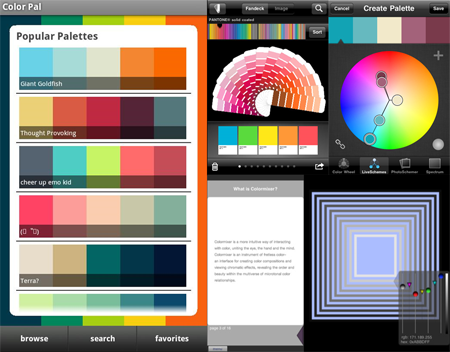
Viewing and Creating Color Palettes
Available for:
• iPhone (ColorSchemer), $2.99
• iPad (Colormixer), $7.99
• iPhone & iPad (myPANTONE), $9.99
• Android (ColorPal), Free
Exploring and assembling colors is fundamental to most creative work. There are top-notch Web-based tools to help you mix colors and build harmonious multi-color palettes (COLOURLovers, Adobe’s Kuler), but there are also apps built specifically for mobile devices. ColorPal for Android, ColorSchemer for iPhone, and Colormixer for iPad are among the best. Each lets you mix colors in a variety of ways, saving and often sharing individual colors or multi-color palettes built manually or automatically based on the first color. If you’re looking to stay within the predictable, color-accurate world of PANTONE, there’s even an app for that—at least for iOS. Using the myPANTONE iPhone (and iPad) app, you can select and work with colors in the massive PANTONE libraries. You can also extract colors from photographs stored on the device to be used as the basis for new palettes.
iFontMaker (iPad Only)
Available for:
• iPad, $7.99
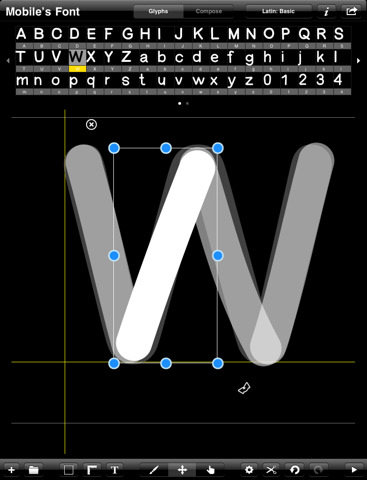
Have you ever wanted to design your own typeface but were intimidated by high-end applications like Fontographer and FontLab? With iFontMaker, you can design TrueType fonts using the touch interface of the iPad. Choose a letter—capital or lowercase—or numeral to draw, and then draw the glyph with your finger or stylus. Imperfect strokes can be sized, rotated, cropped, and deleted. iFontMaker lets you create the initial 62 upper and lowercase letters and numerals of a basic font. It will then generate a Mac- and Windows-compatible TTF font you can use on your computer or even as an @font-face Web font.
There are a few drawbacks: First, you can’t generate an OpenType font format, and to go beyond the basic font, adding punctuation, diacritics, and alternate letterforms, you must take your work into FontLab or another desktop font editor.
WhatTheFont (iOS Only)
Available for:
• iPhone, iPad, iPod Touch, Free
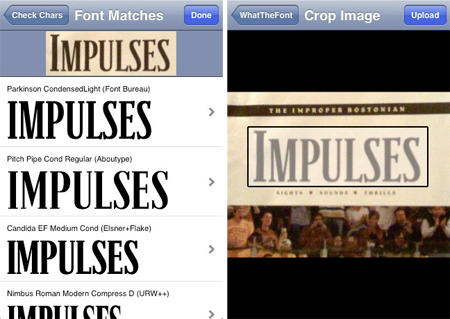
“What is that font?” If you’ve ever found yourself muttering that question, you’ll love the ability of the WhatTheFont app to answer it for you. Built on the tried and true WhatTheFont font identification engine at MyFonts.com, the WhatTheFont app identifies fonts in a photograph. Just take a picture with your iPhone, or open a picture saved on the device or from the Web or e-mail, and the app will examine the typeface used in the image and return possible matches. You can refine the choices and, once you find the right font, the app gives you the opportunity to buy it through MyFonts.com.
For best results when using this app, take a photo showing only text set in the typeface you’re trying to identify. Also shoot portrait mode with a steady hand—blurry images can confuse WhatTheFont.
Photographer’s Mobile Toolbox
Whether you’re a professional shutterbug or a professional designer who occasionally needs to take a good photo, you’ll want to fill your metaphoric mobile camera bag with the following apps.
Camera Genius (iPhone & iPod Touch Only)
Available for:
• iPhone, $0.99
Camera Genius is a replacement for the iPhone’s native Camera app. It does all the same things—takes pictures and video, enables easy sharing of photos via SMS, email, and social media—but Camera Genius goes far beyond the basic native Camera app. In addition to a user interface that makes better use of screen real estate, this inexpensive app boasts a plethora of advanced features, including a shot timer/delay; sound-activated automatic shooting; anti-shake shot stabilization; three-shot burst mode; adjustable thumbnail sizes; tips and tricks manual; composition guides; and more than 20 filters for post-processing photos on the iPhone. There’s even a mode that makes the entire iPhone screen the camera button—no more hunting around for a small button!

Light Meters
Available for:
• iPhone (Pocket Light Meter), $0.99
• Android (Photographic Light Meter Beta), Free
Yes, you can use your phone as a light meter, though the exact capabilities depend on the model. The iPhone version measures reflected light and returns compensatory calculations. The Android version does that and also calculates filter compensations and depth of field.

Depth of Field Calculators
Available for:
• iPhone (Depth of Field Calculator), $0.99
• iPad (Depth of Field Explorer), $2.99
• Android (NJP Field Calculator), Free
Depth of field finders help you determine the distance or size of a subject relative to the camera lens, and thus what camera f/stop and focal length are best for keeping the subject in focus.

Lighting Studio (Android Only)
Available for:
• Android, Free
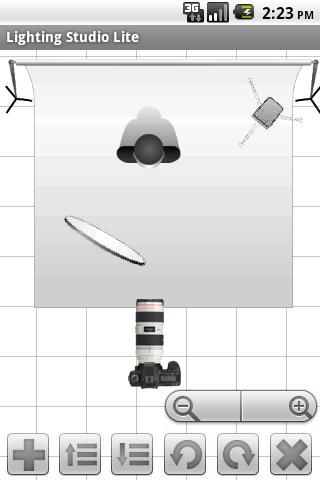
Typically, photographers and videographers plan camera and lighting placement on paper or a white board. This handy-dandy app helps you get greener (and more accurate) by moving the task onto your Android-powered device. You can place and position cameras, strobes, backdrops, flashes, ambient light sources, and models. It’s so useful that you might even be able to forgive the fact that the app’s icon is a blatant knockoff of Lightroom’s. If you can’t forgive, check out Photo Studio Buddy ($4.99). I prefer Lighting Studio’s sleeker interface, but functionally, Photo Studio Buddy is pretty close—and it has different types of models pre-configured.
Ephemeris
Available for:
• iPhone (iEphemeris Lite) Free
• iPad & iPhone (The Photographer’s Ephemeris), $8.99
• Android (Sort of; see below), Free
There’s a lot more involved in outdoor photography than some people realize. To get that perfect shot, against the right background, with ideal sunlight or moonlight, outdoor photographers must time shoots using accurate sun and moon positioning schedules. This type of information is collected in a table or chart called an ephemeris. A digital ephemeris is phenomenally useful—and cost-effective. By providing up-to-the-second sun and moon positioning, angle, and phase information accurate to any particular three-meter area on Earth, a digital ephemeris can replace handfuls of notebooks and reference books and GPS devices costing thousands of dollars.

An Android version of the Photographer’s Ephemeris is planned, but when it will be available is anyone’s guess. But there is a workaround: Because Android-powered phones and tablets can use Adobe Flash and AIR technologies, and because the desktop version of the Photographer’s Ephemeris is built in Adobe AIR, you can use the desktop version on an Android device. Bonus: It has even more information than is available in the native iOS version! First, download Adobe AIR (free) to your Android device, and then install the Photographer’s Ephemeris AIR application.
Go to page 2 for the apps you won’t want to live without.
This article was last modified on January 18, 2023
This article was first published on February 21, 2011
Commenting is easier and faster when you're logged in!

Recommended for you

Create Kerning Report
If you have a document with lots of manually kerned pairs, you can use this scri...

Before&After: How to Use that Typeface
That font you just learned about won’t work just anywhere; it has a style that n...