



About three years ago (a lifetime in digital camera years), Canon released the EOS D30, a 3-megapixel digital SLR that was revolutionary for a number of reasons, including its use of a CMOS image sensor that is more cost-effective and more energy-efficient than the CCD image sensors used by most digital cameras. In addition to its excellent feature set and support for Canon’s full line of lenses, the D30 was a breakthrough in terms of price. At $3,000, it was a full $2,000 less than its nearest competitor.
Soon after, Canon followed the D30 with the EOS D60, a 6-megapixel version of the D30 that provided a few feature tweaks, and which knocked a thousand bucks off the sticker price.
Then, earlier this year, even though the D60 was still a bestseller, Canon discontinued that model, announced the much-improved EOS 10D and knocked another $500 off the selling price, meaning you can now buy a full-featured, high-quality 6-megapixel digital Canon SLR body for $1,500 (lenses are extra).
Dropping an already excellent camera’s street price to $1,500 would have been news enough (list price is actually $2,000 but we found no units priced at more than $1,500 at retail outlets). But Canon went further. The EOS 10D sports a redesigned the body, adds a slew of new features, and boasts dramatically improved autofocus, making the EOS 10D the camera to beat in the world of digital SLRs.
Body Work
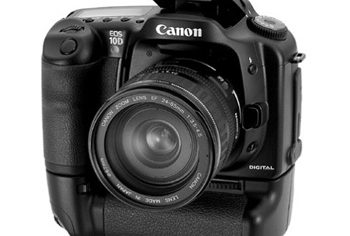
Like its predecessors, the 10D follows the design of Canon’s EOS series of 35mm cameras. Though the D30 and D60 were sturdy cameras with good heft and build quality, the 10D feels like a more substantial and stronger camera, thanks largely to the new magnesium alloy body. Canon has also made a lot changes to the body design, moving controls and reshaping the body with a curvier look that is extremely comfortable to hold (see Figure 1).
 Figure 1: The Canon EOS 10D’s magnesium alloy body makes for a sturdy camera with good heft that’s easy to hold.
The 10D uses the same 6.3-megapixel CMOS sensor as the D60, but adds Canon’s new DIGIC chip, the same one used in Canon’s new digital point-and-shoot cameras. The DIGIC chip controls the camera’s image processing — shooting features such as white balance as well as post-processing features such as “demosaicing” and image enhancement. In addition to providing higher-quality images, the DIGIC chip uses much less power than Canon’s previous image-processing circuitry, meaning the 10D delivers slightly longer battery life than the D60.
The 10D is an extremely comfortable camera to shoot with. The standard EOS lens mount makes changing lenses a snap, while the molded handgrip gives you a sure hold. The viewfinder provides 95-percent coverage and is very bright and clear.
Autofocus Upgrade
The most significant change over the D60 is the 10D’s dramatically improved autofocus system. Both the D30 and D60’s autofocus capabilities suffered from extremely poor low-light performance and overall slow speed. Canon has completely replaced the autofocus system and the result is a camera that can focus in extremely low light. Focus speed is partly determined by your lens but overall, focusing is much faster, and substantially more reliable than on the 10Ds predecessors.
Further improving autofocus performance are four additional autofocus spots, for a total of seven. What’s more, the 10D now provides illuminated autofocus indicators within the viewfinder, so you can easily tell which spot the camera has selected. (As with previous models, you can also manually select an autofocus point.)
The camera lacks a focus assist light and, for the most part, doesn’t need one. For those rare occasions when it is too dark to focus, the camera uses its on-board flash as a focus assist.
Shutter lag (the time between when you press the shutter release, and when the camera shoots the image) has never been a problem with Canon’s digital SLRs, but Canon has still managed a slight performance improvement with the 10D. The speedy shutter response and quick, reliable autofocus make the 10D an extremely responsive camera.
Shoot and Play
As with all Canon digital SLRs, the 10D does not include separate modes for shooting and playback. While reviewing images, you can hit the shutter release button to immediately return to shooting. This “shooting-priority” feature means you’ll never miss a shot while waiting for the camera to change from playback to shooting.
Further adding to the camera’s quick shooting prowess is a smart buffering scheme that allows you to shoot up to nine full-resolution shots at three frames per second. Even if you don’t regularly shoot bursts of images, the 10D’s buffering ensures that the camera is always ready to fire. In addition, boot time is slightly improved over the D60. From power-up, the 10D is ready to shoot in roughly two seconds.
A number of different shooting modes provide a wealth of options from full automatic to full manual, with many special presets for specific shooting situations — landscape, portrait, etc. But, like its predecessor, the 10D also provides simple access to exposure compensation and reciprocity controls — each in the form of a dial — that make it easy to perform most of the manual overrides that you’ll ever need, without having to change to a special shooting mode, or dig into the camera’s menu (Canon’s EOS 10D Web site has lots of pictures of the camera’s body and dials — if you can put up with the Flash animations.)
The 10D has a single Type II CompactFlash slot for all types of CompactFlash cards and is fully IBM MicroDrive compatible. The camera now supports the FAT32 file system, which means you can use larger capacity media devices such as the new multi-megabyte Type II flash cards.
In short, shooting with the 10D is a joy. Well-designed, comfortable to hold, and speedy to perform — even the sound of the camera is satisfying, and slightly quieter than previous models.
This article was last modified on January 18, 2023
This article was first published on May 13, 2003
Commenting is easier and faster when you're logged in!

Recommended for you

Sony RX100 V Review: The Ultimate Travel Camera
The new Sony RX100 V is the latest release in the Sony RX100 point-and-shoot ser...

Scanning Around With Gene: The Photographic Moment of Truth
For several years in high school I worked part time at a small pharmacy that sol...

Photojojo University
Photojojo, the site that brought you such goodies as the camera lens coffee mug...