



This tutorial is courtesy of the Russell Brown Show.
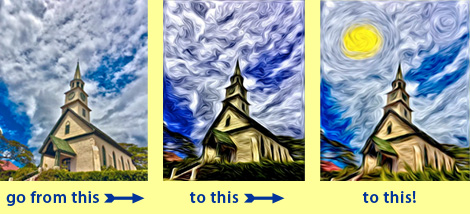
Pixel Bender, a set of plug-ins that’s compatible with Photoshop CS5, includes many filters that take your images in new directions. But in this tutorial, you’ll learn how to go even further, transforming the oil paint filter beyond its stock results and creating a unique piece of art.
Download Pixel Bender from Adobe Labs.
Don’t have Photoshop CS5? Download the free trial.
To open the QuickTime tutorial video in a separate window, click the screenshot below:

To view the video on an iPhone or iPad, click here.
This article was last modified on September 27, 2010
This article was first published on September 27, 2010
Commenting is easier and faster when you're logged in!

Recommended for you

Scanning Around with Gene: Scuba-Diver Chic
[Editor’s Note: Today we present the first installment of Gene Gable...

Design How-to: Endless Pattern Possibilities
This story is taken from “Before & After” Magazine. You can subs...

Creating Editable Extruded Text in Photoshop
Extruded text is a popular effect, and it’s not difficult to create...