





Creativepro.com readers can subscribe to “Before & After” at a discount. Click here to learn more.
Designers like to put things in boxes. Whether it be text in a frame or an image in a keyline, rectangular boxes give a layout structure and order. The alternative — freeform graphics with irregular text wraps — may be appropriate for some projects but can yield clutter and chaos in others. But with imaginative cropping, you can make an image appear to break out of the confines of its frame while maintaining geometric discipline.
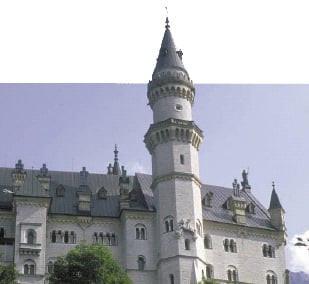
By allowing pieces of an image to emerge from its rectangular background, you add impact and drama to your layout. Not every image is suitable for this treatment, but once you master the technique, you’ll be amazed how many photographs lend themselves to selective cropping.
Learn how to push your image boundaries in this feature from our partner “Before & After” magazine.
We’ve posted this story as a PDF file. All you do is click this link “Fascinating Stick-outs” to open the PDF file in your Web browser. You can also download the PDF to your machine for later viewing.
To open the PDF, you’ll need Adobe Acrobat (4 or higher) or Adobe Reader, which you can download here:
 .
.
To learn how to configure your browser for viewing PDF files, see the Adobe Reader tech support page.
This article was last modified on July 18, 2023
This article was first published on November 14, 2003
Commenting is easier and faster when you're logged in!

Recommended for you
Three Tips for Using Illustrator’s Pattern Brushes
If you haven’t delved into making custom pattern brushes in Illustrator, y...
How to Create Trees in Photoshop, Part 1
One of the more surprising features in the latest update to Photoshop CC is its...

Creating "Hobbit" Type in Photoshop and Illustrator
Unless you’ve been living under a rock the size of a cave troll, you...