




Creativepro.com readers can subscribe to “Before & After” at a discount. Click here to learn more.
Patterns add bite to an illustration or layout, but scanned images and other pixel-based backgrounds can add lots of bytes to your project as well. Vector textures are more efficient in terms of file size.
Better yet, PostScript patterns are infinitely scalable and repeatable, so they can be applied to any project, whether as large as a billboard or as small as a matchbook.
Best of all, programs like Adobe Illustrator and Macromedia FreeHand make it easy to transform a simple line into a complex pattern.
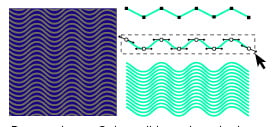
See how to create and apply drawn patterns in this feature from our partner “Before & After” magazine.
We’ve posted this story as a PDF file. All you do is click this link “How to Create Texture with Lines” to open the PDF file in your Web browser. You can also download the PDF to your machine for later viewing.
To open the PDF, you’ll need Adobe Acrobat (5 or higher) or Adobe Reader, which you can download here:
 .
.
To learn how to configure your browser for viewing PDF files, see the Adobe Reader tech support page.
This article was last modified on July 18, 2023
This article was first published on January 30, 2004
Commenting is easier and faster when you're logged in!

Recommended for you

Why the “Document fonts” folder and Data Merge don’t mix
Why document fonts may not work as intended with Data Merge in InDesign, and how...
A Script for Making Bar Graphs with GREP
Free script provides a solution for creating bar graphs from live text in InDesi...

Editor’s Picks for The Presentation Design Conference 2026
Our Editor in Chief lists his five must-see sessions at The Presentation Design...