




With modern stitching software, digital photographers have a capability that film photographers never dreamed of: they can shoot multiple images and stitch them into seamless wholes. However, though stitching is a great way to create big panoramas, it’s easy to forget about more traditional collage-work. As you’ll see in this short article, following in the footsteps of your pre-digital forebears might lead you to a more interesting image.
In the pre-digital days, if you wanted to take a panoramic image, you had to shoot multiple, overlapping shots and then layer prints on top of each other to create a collage. (Some photographers differentiate between this technique and photo montage, a process of layering multiple negatives to create a single print.) Though collaging can create a pleasing overall result, the details are often a little rough — perspective can vary from print to print, seams don’t match, objects can be duplicated.
Digital stitching software uses software to perform precise warping and blending of your source images to create a seamless panorama that looks like a single, wide-angle photograph. With panoramic software, you can take shots of extremely wide vistas.
I took these three images:

and stitched them using Canon’s PhotoStich to create this panorama:

Stitched panoramas are good even for less expansive subjects. Any time you need a wide-angle view, a stitched panorama can serve as a suitable replacement for an extremely wide-angle lens, as in these shots below:
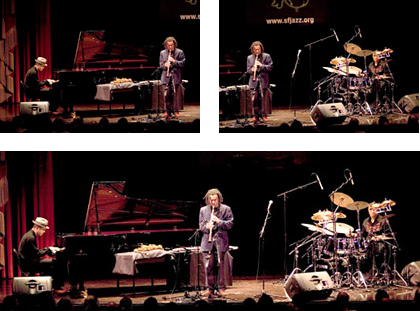
Because of their small sensors, it can be very difficult to find a digital camera with an extremely wide angle lens (this is true even for higher-end digital SLRs.) So, with wide-angles being a challenge for digital photographers, the ability to shoot and stitch wide-angle panoramas is even more important.
You can learn more about panoramic shooting and stitching in Chapter 9 of Complete Digital Photography, Third Edition.
Digital Photo Collage
One of the big drawbacks of digital panoramic stitching, though, is that it can lead you to forget about the advantages of photo collage. Once you’re in the habit of thinking about stitching, you might forget that, oftentimes, it’s the less perfect image that is far more evocative of your subject.
Designer Kalonica McQuesten created this photo collage of a Roman amphitheater from a series of images shot with a Canon Digital Elph.
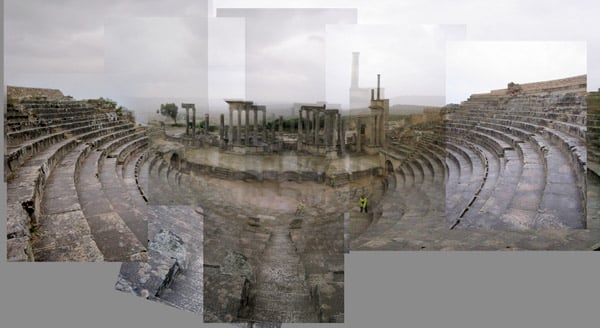
Certainly, this scene could have been shot as a panorama, with a series of carefully tiled images that could later be stitched into a seamless whole. The result would be a more accurate representation of the literal location. But it would also probably produce a much more boring image than the one she came up with.
However, though this image might be a throw-back to traditional photo collage, it’s still firmly rooted in the digital world thanks to her use of transparency for different layers in the collage. By sticking each photo in a separate layer in Photoshop (and in some cases, grouping layers into Layer Sets), she was able to alter the transparency of each separate image (see below).
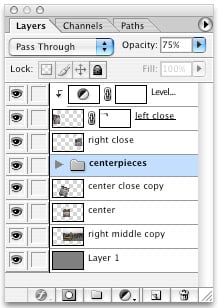
The resulting effect contributes to the overall “ruined” atmosphere and serves to create a more compelling image than would a simple stitching.
So, next time you’re preparing to stitch a scene, consider first spending some time with some simple layering and collaging. You may discover a far more interesting image.
This article was last modified on December 14, 2022
This article was first published on February 24, 2006
Commenting is easier and faster when you're logged in!

Recommended for you

Color Management is Not Color Correction
In the webinar I presented to the Graphic Artists Guild titled Color Manage...

Remove.bg: A Worthy Alternative to Photoshop’s Select and Mask
Get to know this web-based app that performs instant photo cutouts with a remark...

Adobe's Guide to Tuning Photoshop for Peak Performance
If you do a lot of Photoshop work, it behooves you to spend some time to configu...