



CS4 Web Standard includes four applications:
- Adobe Dreamweaver CS4
- Adobe Flash CS4 Professional
- Adobe Fireworks CS4
- Adobe Contribute CS4
I’ll concentrate on the first two programs in this first look. The following information is based on my experience using betas of the CS4 apps since July of this year.
Dreamweaver CS4
After InDesign CS4, Dreamweaver CS4 is the beta I’ve used the most: I do a lot of XHTML revisions and site updating. Dreamweaver is also one of the best upgrades.
Adobe has stated that fully integrating Dreamweaver and the other products that came from Macromedia with Adobe’s was one of the top priorities of CS4. And in fact, Dreamweaver CS4’s panels do behave like other Adobe apps, which I like. However, Dreamweaver’s Insert bar is now a panel, which I’m not keen about — I would rather have a toolbar, as in other Adobe apps. And some interfaces, such as the Files panel, haven’t changed much since the Macromedia days.
Kvetching aside, the new Related Files is bound to be a crowd-pleaser. Most modern Web pages are dependent on stylesheets and external JavaScript documents to give the pages styling and functionality. I can’t count the number of times I needed to revise both a Web page and its stylesheet. Dreamweaver CS4’s Related Files bar displays all files related to an open document — including stylesheets — and lets you access them with one click. The Design view updates in real time when you make style changes.
Related Files will make life a lot easier.

The Code Navigator is also a handy new feature. Command+Option-click an element on a page and the Code Navigator window will appear and display the various CSS rules being applied to it. Click on a rule and you’ll go right to it for editing. This is especially handy when you have complex Web pages with a lot of styles.
Even better is Live View and Live Code. I’ve always hated how Dreamweaver couldn’t show you exactly how your page was going to look in multiple browsers. Live View makes the Dreamweaver CS4 Design view into basically a browser preview: guides and aids are removed, data is brought in from any external sources, and scripting such as Ajax functions work as expected. It’s really amazing, and it’s another candidate for the most groundbreaking CS4 feature.
The yellow background signals the switch to Live Code. Click on the image to see a larger version.

Live Code works in conjunction with Live View: As you interact with a Web page in Live View, Live Code shows you how the page’s code is being updated. If a JavaScript or Ajax function is doing things with the code, you’ll see it. It brings Web designers one step closer to a true WYSIWYG interface.
Dreamweaver CS4 lets you place Photoshop files and generates a Web-ready graphic according to your optimization settings, which isn’t big news. However, Dreamweaver CS4 links the image on the Web page directly to the Photoshop file, so if you revise the Photoshop file, Dreamweaver CS4 revises the Web graphic automatically.
If you’re more of a designer than a developer, you’ll be happy to hear that Dreamweaver CS4 can create dynamic data sets from simple HTML tables. It’s easy to do and quite effective, plus Live View lets you test everything in the app.
Many clients want to revise content on pages you’ve designed. Adobe has its Contribute app for this purpose, but Dreamweaver CS4 does Contribute one better with InContext Editing. While it’s similar to Contribute, it requires only a browser to access the online InContext Editing service.
There aren’t not many more new features to Dreamweaver CS4, but it is an impressive upgrade nonetheless.
Flash CS4 Professional
The big news (and rightly so) is Flash CS4 Professional’s new object-based animation engine, which replaces the frame-based engine Flash used for many years.
Thanks to this change, you can now animate two instances of a symbol on the same layer at the same time. After Effects users will love the change — it’s pretty much what they’re accustomed to. The Flash developers even moved the Timeline panel to the bottom of the page because that’s what After Effects users are used to.
The Flash CS4 Professional interface. Click on the image for a much larger version.

Animating symbols is different with the new engine but not difficult: Place a symbol, set your timeframe span, and move the item where it should go. Motion paths now show up for animated symbols, and you can edit them with the Selection tool, though this gets complicated — grabbing the motion path and shaping it as you wish can be hard to do.
A motion path
img src=”/wp-content/uploads/sites/default/files/story_images/cs4_flash_motion.jpg” border=0/>
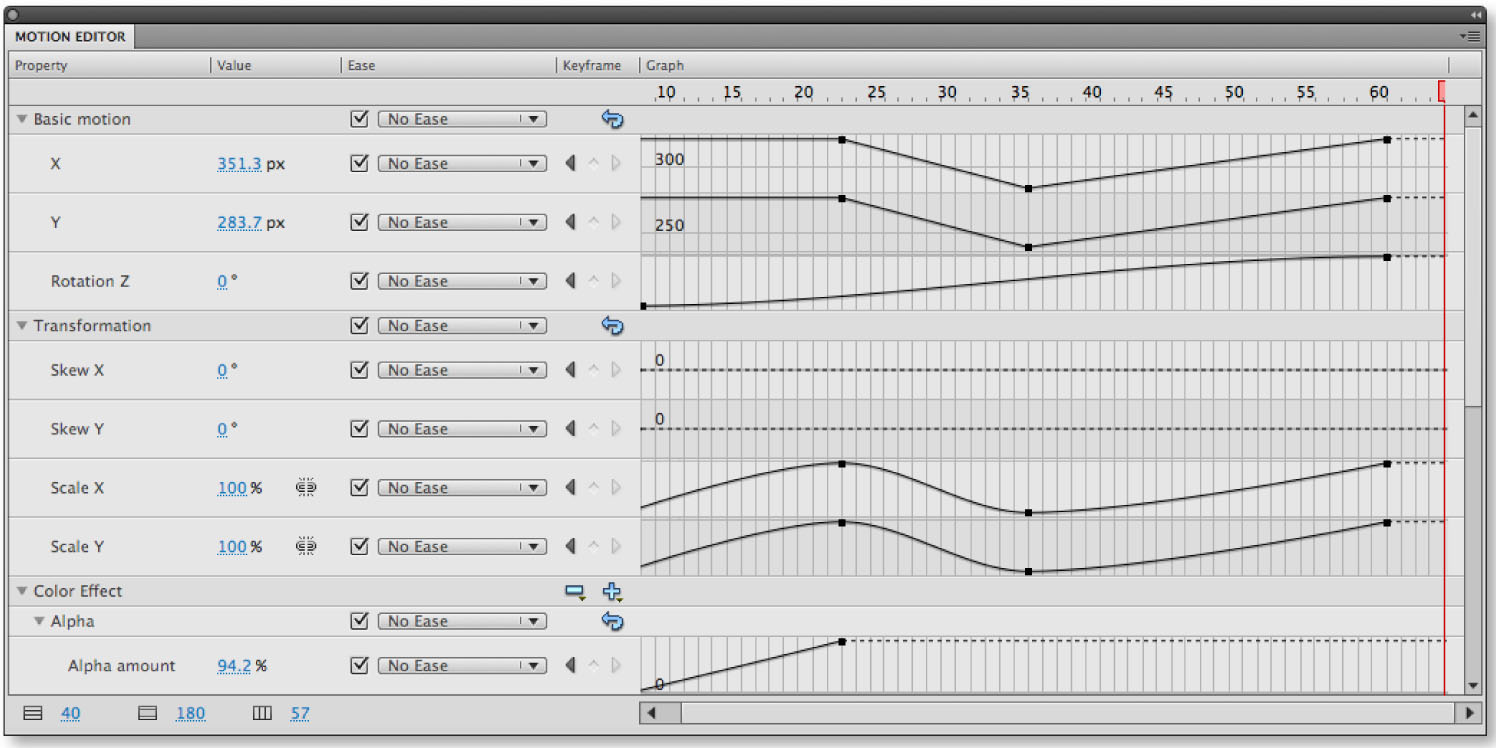
It gets even more complex with the new Motion Editor panel, another idea borrowed from After Effects. The Motion Editor panel lets you tween attributes of animations, everything from coordinates and rotation to effects and transformations. This kind of control is what makes After Effects so powerful and yet so maddening to the beginner. Experienced Flash users may have a steep learning curve with CS4. Beginners may find it overly complex, but Flash is a complex beast anyway — perhaps Flash CS4 will be more intuitive for them.
The Motion Editor. Click on the image for a much larger version.
You can apply Flash CS4’s 16 motion presets to symbols to create instant animations. Just select a symbol instance, click the preset, and click Apply.
More about Flash on page 2!
This article was last modified on December 17, 2022
This article was first published on September 23, 2008
Commenting is easier and faster when you're logged in!

Recommended for you

Creativeprose: The Power of Words
Last week, we published an article called, "Efficiency: It’s Not Just...

A Star Is Born: Deke McClelland's Photoshop Music Video
You’ve probably heard of prolific software trainer Deke McClelland. Hell,...

Making Custom Arrowheads
InDesign offers several choices for stroke endings, such as arrowheads, tailfeat...