




CS4 Design Standard includes four applications:
- Adobe InDesign CS4
- Adobe Illustrator CS4
- Adobe Photoshop CS4
- Adobe Acrobat 9 Pro
Since Acrobat 9 isn’t new, I’ll concentrate on the first three programs in this first look. The following information is based on my experience using betas of the CS4 apps since July of this year.
InDesign CS4: One of My Favorites
I’m a proponent of InDesign’s interactive features, so I’m pleased that InDesign CS4 has several improvements for creating Flash and PDF presentations. Some people pooh-pooh the idea of using a print application to create multimedia, but I know clients call for this sort of thing all the time, and not all InDesign users are also skilled Flash users.
The Buttons panel is a lot more robust now, and there’s a Sample Buttons panel with a library of easy drag-and-drop buttons. The Hyperlinks panel is also enhanced.
One of the best new interactive features involves page transitions. You can set pages to transition with a variety of animations, and the Page Transitions panel gives you complete control. It’s a lot better than setting transitions with Acrobat. And you can now export documents as Flash CS4 Pro (using the new XFL format) or SWF.
From InDesign to Flash. Click on the image for a much larger version.

Because you can add page transitions or an interactive page curl to Flash documents, publications like catalogs and newsletters can now be deployed as Flash and still give users the popular “page turning” experience.
Smart Guides, Smart Align and Smart Cursor are three major additions. When you drag elements, the cursor will show your x-y coordinates in a small pop-up window. Moreover, Smart Guides will show you when the dragged object is aligned, evenly spaced, rotated or resized in relation to nearby objects. It’s especially handy when you want to distribute spacing among items — Smart Align will snap you right where you want to be. One downside: if there are a lot of elements on the page, you may find yourself snapping where you don’t want to go.
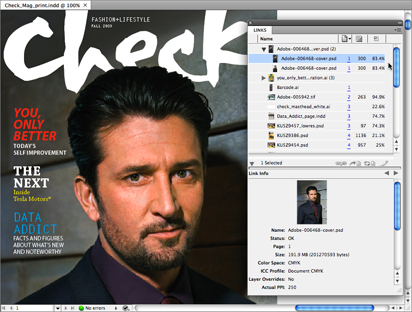
The Links panel has been improved substantially. Linked items are shown in the panel with thumbnails, and you can go directly to that image in the layout. Multiple instances of a single linked item show up only once, which really saves space. You can also review a linked image’s color space, scale, and effective resolution within the Links panel.
The Links panel in CS4.
The new cross-reference feature is also impressive. You can link instances of text to a master in the same or different documents, and if you change the master, the child instances will change accordingly. Designers of forms and long documents will love it — I use the feature to make my invoices and contracts easier to complete
The Live Preflight feature might get my vote for “Most Groundbreaking CS4 Improvement.” Designers have always preflighted documents at the end of production, weeding out RGB images and spot colors before going to press. InDesign CS4 immediately alerts you when a potential problem arises. The Live Preflight status is at the bottom of the layout. Live Preflight checks layouts according to preflight profiles, which you can save and customize. I use Live Preflight all the time and I love that when I finish a layout, all I have to do is package the job and go!
In CS4, preflighting is a whole new ballgame. Click on the image for a much larger version.

Other new InDesign CS4 features:
- The ability to add effects to an object’s stroke, fill and/or content
- Support for Photoshop 3D artwork
- Support for Illustrator CS4 artboards
- Edit With menu item lets you specify the application to edit graphics with
- Relink To Folder lets you relink multiple items in a different folder
- Conditional Text panel to show/hide text and create versions of documents
- Smart Text Reflow can add pages dynamically to a layout when text is reflowed
- Use Data Merge to output directly to PDF without an intermediary InDesign file
- New InDesign Markup Language (IDML) lets XML applications create InDesign layouts without InDesign
Later today, subscribers to InDesign Magazine will enjoy even more early news on CS4: two step-by-step tutorials on adding interactive buttons (complete with page curl) and using the new Preflight abilities. To get in on the action, renew or subscribe now.
Photoshop CS4: Changes Major and Minor
Of all the CS4 applications, Photoshop CS4 has the most changes that I don’t like. My biggest beef is with the new Adjustments panel, which lets you handle adjustment layers in a panel format. The idea is to collect all the adjustment layer types in one place and to avoid using dialog boxes to adjust them.
The new Adjustments panel. Click on the image for a much larger version.

However, I use a lot of Curves adjustment layers, and I like to use the Curves dialog box because it’s large and detailed. Now I have to use the tiny Curves readout in the Adjustments panel, or switch to the Expanded View. However, Expanded View requires the whole panel to increase in width, which eats up a lot of screen area.
The Masks panel, which is supposed to help you create and refine masks, is another newcomer that’s a bit of a disappointment. It brings together a few of Photoshop’s existing tools (Refine Edge, Color Range, etc.) and adds a few new ones: the Density and Feather sliders. The Density slider controls mask opacity while the Feather slider basically does what the Refine Edge > Feather slider does, but non-destructively.
The new Masks panel. Click on the image for a much larger version.

I do like Photoshop CS4’s improved speed and stability. The Photoshop team has a few more cool things coming regarding OpenGL and improved graphics processing, but those features aren’t in my beta version.
Photoshop CS4’s Camera Raw module picked up a few tricks from the recently released Lightroom 2, including an Adjustment Brush to apply basic adjustments and a Graduated Filter tool. Both of these tools are excellent additions to Lightroom 2, and they’re just as worthwhile in Photoshop CS4.
There are many other new features in Photoshop CS4. Here are a few of them:
- Improved Dodge, Burn, and Sponge tools help preserve tonal and color quality
- Photomerge now has enhanced blending and stitching for better panoramas
- Auto-blend can now combine images for better lighting and depth-of-field
- The Rotate View tool can rotate the canvas onscreen for easier painting and drawing — a great addition for tablet artists
- Increased motion graphics support and compatibility with After Effects and Flash
More news and more screenshots on page 2!
This article was last modified on January 18, 2023
This article was first published on September 23, 2008
Commenting is easier and faster when you're logged in!

Recommended for you

The Inspired Type Designs of Sofia Mohr
Sofia Mohr has been very busy the last few years. This Brazilian architect, who...

Goodbye, Bruce Fraser
After battling lung cancer for several months, Bruce Fraser passed away on Decem...

5 Ways Photography Skills Can Improve Your Graphic Design
For some, making the connection between photography and graphic design is pretty...