




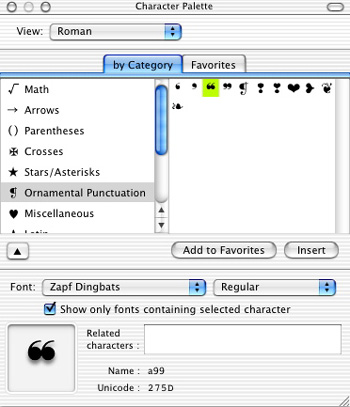
The Character Palette in Mac OS X is a very cool font viewer and character selector — sort of like KeyCaps on steroids (see Figure 1).
Unfortunately, for some reason Apple made it very hard to get to initially. After you “install” it, it shows up in the menu bar of every non-Classic application (see Figure 2).
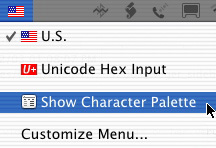
Here’s how to activate the Character Palette on your system: Choose System Preferences from the Apple menu (or the Dock), then click on the “International” preference (see Figure 3). In this window, click the “Input Menu” tab. You’ll see a list of every possible input method installed in your system. Click the checkbox for “Character Palette” and you should see a little flag appear in the menu bar; in my system, it’s a U.S. flag, but it depends on your primary language. That’s it; you can quit System Preferences, and from then on the Character Palette menu will be in your menu bar.
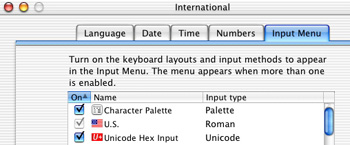
I’ve also checked the “Unicode Hex Input” checkbox, which allows me to enter any Unicode character directly from the keyboard. More on the this, and on hidden features of the Character Palette, in my next article.
Back to main story.
This article was last modified on January 3, 2023
This article was first published on August 23, 2003
Commenting is easier and faster when you're logged in!

Recommended for you

Backups for Busy Creatives
An overview of how to prepare for a data emergency, from the literal least you c...

Tip of the Week: Controlling the Glyphs Panel Display
This tip was sent to Tip of the Week email subscribers on March 26, 2015. Sign u...

Making a Fillable 1099 MISC PDF for Printing
I couldn't find one one the web, so I made my own! And you can, too!