



My mind must have been pre-occupied with socio-politico thoughts when I wrote this installment of Free for All, which contains freebies that are all “industrialized” in some way. But unlike most products of Big Business, these things are all free.
Online Chart Generator
Need to generate interesting charts but don’t excel at Excel or Illustrator? Then this free online chart generator is for you, friend. It creates downloadable PNG charts on the fly from your labels, values, and attributes, instantly and more easily than most paid chart creation applications.
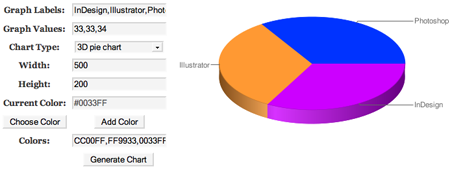
The online application doesn’t come with instructions, so, if I may be so bold, I’ll offer my own:
1. Enter the numeric values of your chart in the Graph Values field. Numbers should be entered comma-separated. Each value will translate to a piece of the pie, a bar, or point on line, sparklines, Venn, scatter, and radar charts.
2. In the Graph Labels field, enter comma-separated labels corresponding to each of your values. In other words, if you’re making a five-piece pie chart with five values in the Graph Values field, enter five labels so that the generator can label each of your pie pieces appropriately.
3. Select the type of chart you’d like to generate from the Chart Type dropdown. There are quite a few options there, some less frequently used than others. Give them all a look; you might discover a way to present your data you hadn’t considered before.
4. In the Width and Height fields, enter the size of the chart you need to generate in pixels. The resulting image will be a 72 dpi PNG. Thus, if you’re trying to take the chart to a printing press, you’re out of luck. You can, however, use high values in the Width and Height fields to get larger images, which can be scaled down for better resolution when printed, though you still probably won’t get printing press quality.
5. The color fields are rather confusing. Ignore Current Color entirely. Basically, the Colors field contains comma-separated HTML hex color codes for each of the portions of your chart, corresponding to the order of the graph values. If you know the colors you want to use, type them into the Colors field, comma-separated, without spaces. If you aren’t sure which colors you want, click the Choose Color button, pick a color from the popup swatches chart, and then click the Add Color button to add your chosen color’s value to the Colors field. Repeat as needed to add all the colors for all your values.
6. Finally, click Generate Chart to create your chart. When it appears onscreen, which should be nearly instantly, right-click the image and choose Save Image As (or a similar command if your browser says something else), and save the chart to your computer.
PhotoTools Plug-ins for Photoshop
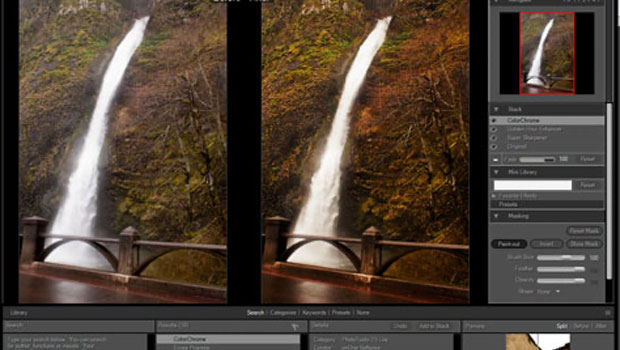
While you’re waiting to get your hands on Photoshop CS5 (there’s a free trial download here), check out this suite of 18 free plug-ins for Photoshop CS2, CS3, and CS4 from onOne Software. PhotoTools 2.5 Free includes 18 photographic effects and the ability to combine several of those effects for even more options. Don’t let the “free” tag fool you — this isn’t a bunch of low-quality plug-ins you’ll never use. The effects in PhotoTools 2.5 Free are practical, everyday effects and image processing filters that are a boon to any digital photographer’s or graphic designer’s bag of tricks. Click the screenshot below to see a larger version.

Here are the effects in the package:
* Chrome
* HDR Look
* Black Soft
* Super Sharpener
* Turbo Boost
* Model Skin
* Impression
* Green Velvet
* Graduated Blue
* Golden Hour Enhancer
* Digital Fill Flash
* Cross Process
* ColorChrome
* Boost Color
* Bleach Bypass
* Brush Darker
* Brush Lighter
* Brush More Dynamic Range
Get it now before onOne realizes how silly they are for giving it away!
Adobe Photoshop Lightroom 3
So, yeah, Adobe Photoshop Lightroom 2 is a commercial application, not a free one. Lightroom 3, however, is free — for now. It’s in beta status, but don’t let that pesky beta distinction deter you from turbo-charging your image management. I can personally attest that the stability and utility of this particular beta is better than most “final” retail applications. Someday soon the beta will expire, and Lightroom 3 will become a commercial application. For now, though, it’s free and it’s the best photo management application out there. Click the screenshot below to see a larger version.

With image management, individual and batch photo correction and processing, and more organization and categorization features than you can shake a memory stick at, I believe that Adobe Photoshop Lightroom 3 is an app worth paying for. Try the beta and see if you agree!
Go to page 2 for 25 industrial-looking fonts, and a Photoshop template for creating iPad apps.
This article was last modified on August 13, 2021
This article was first published on May 3, 2010
Commenting is easier and faster when you're logged in!

Recommended for you
Scanning Around With Gene: Stuff I Miss About Photography
For my thirteenth birthday, my father gave me a “junior darkroom” kit and taught...

Remove.bg: A Worthy Alternative to Photoshop’s Select and Mask
Get to know this web-based app that performs instant photo cutouts with a remark...
Photoshop Week 2014
Any time is a great time to expand your Photoshop knowledge, but you might want...