




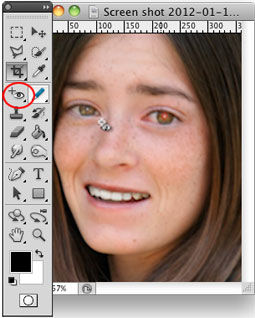
Over the years, many people have written tutorials on fixing red eye in photos; in fact, CreativePro.com has published several! The various techniques have involved channels, brushes, sponges, selective color, and more. But did you know that since Photoshop CS2, there’s been a dedicated Red Eye tool? It’s hiding under the Spot Healing Brush on your toolbar.
This article was last modified on May 8, 2025
This article was first published on January 18, 2012
Commenting is easier and faster when you're logged in!

Recommended for you

Scanning Around With Gene: Pay Up, or Else!
I’m at an age in life where my finances should be totally secure, but like...

Creating Custom Shadows in Photoshop
Learn how to create shadows that add a whole new layer of meaning to a photo.
Meet the Neo SmartPen: A New Way to Draw
As an artist who specializes in combining traditional and digital tools, I’m alw...