


Illustrator How-To: Designing Print-Friendly Greeting Cards with Sarajo Frieden


This story is taken from “Adobe Master Class: Illustrator Illuminated.”
Peachpit Press is offering this book to creativepro.com readers at a special discount. Click here to learn more.
Sarajo Frieden’s Illustrator work is whimsical, colorful, and full of texture — which in PostScript parlance can mean complicated paths laden with points.
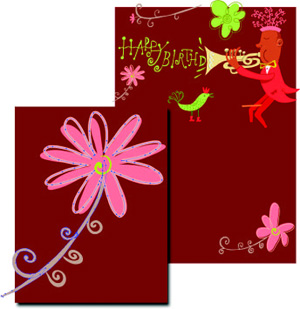
But Frieden knows that what seems complex on the surface can be simplified underneath. Follow along as Freiden develops a greeting card for UNICEF. She takes you from sketching the concept to defining her color palette to crafting her own type to creating a second project for the same client. And you’ll learn her tricks for using Illustrator’s Simplify command to ensure her work will print efficiently.
We’ve posted this story as a PDF file. All you do is click this link “UNICEF Greeting Card Project” to open the PDF file in your Web browser. You can also download the PDF to your machine for later viewing.
To learn how to configure your browser for viewing PDF files, try these tips from Adobe:
- Click here for Explorer on the Mac
- Click here for Explorer on Windows
- Click here for Navigator on Windows
- Click here for Navigator on Mac.
This article was last modified on July 20, 2021
This article was first published on April 30, 2003
Commenting is easier and faster when you're logged in!

Recommended for you
How to Make Custom InDesign Bullets From a Photo
Learn how to make custom bullets from a photo in InDesign, with the help of the...

Auto Numbers and Bullets Pick up Local Formatting
Be careful when you apply local text formatting to the first word or two of a pa...

Working with Guides in Photoshop
Use these handy shortcuts when working with guides in Photoshop.