





This story is taken from “Real World Adobe InDesign CS.”
Tables provide a compact way of presenting complex information in a layout. But many creative folk shudder at the prospect of designing them. Tables are boring and difficult to format, goes the common thinking. And tables mean using Excel, right? Ick.
Well, ever since Adobe InDesign 2, designing tables got a whole lot better .Tables are without a doubt one of InDesign’s coolest features, letting you create not only sophisticated data charts but also clever image grids. InDesign CS adds several new table features, including automatic header and footer rows,
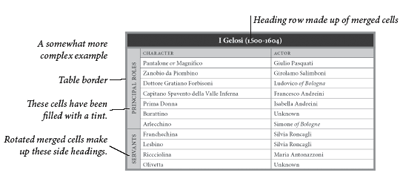
In this excerpt from “Real World InDesign CS,” layout maestros Olav Martin Kvern and David Blatner takes you inside InDesign’s prodigious table-creation feature. .
We’ve posted this excerpt as a PDF file. All you do is click this link “Tables” to open the PDF file in your Web browser. You can also download the PDF to your machine for later viewing.
To open the PDF, you’ll need a full version of Adobe Acrobat (5 or higher) or the Adobe Reader. To learn how to configure your browser for viewing PDF files, see the Adobe Reader tech support page.
Excerpted from “Real World InDesign CS” © 2004 Olav Martin Kvern and David Blatner. Reproduced by permission of Pearson Education, Inc. Publishing as Peachpit Press. ALL RIGHTS RESERVED.
This article was last modified on March 10, 2025
This article was first published on September 8, 2004
Commenting is easier and faster when you're logged in!

Recommended for you

ChainGREP: A Script that Gives You GREP Super Powers
In my experience, there are there are two keys to achieving amazing feats of eff...

Linking & Syncing Content in InDesign
When you need to use a piece of content in different formats and places in InDes...

Free Webinar: Photoshop + AI—Smarter Tools, Better Results
Learn how to use Photoshop’s AI tools to speed up your editing process and...