





Total Training has many more titles like this one. Click here to learn more.
Adding drop shadows to text or graphics has long been a fashionable way to add depth and flair to an otherwise ordinary layout. And for many years, the only way to create drop shadows was by using Photoshop and then importing the shadowed graphic into your layout program. That technique worked, of course, but it was less than ideal. Making changes to the drop shadow would mean going back into Photoshop and then replacing the graphic or text.
Drop shadows are just one of many transparent effects you can have in Adobe InDesign. Unlike QuarkXPress, which requires you to use clipping paths for transparency, Adobe InDesign lets you create drop shadows and other transparent elements on the fly.
Better yet, they remain completely editable within the page layout.
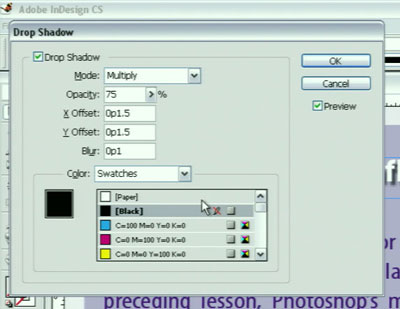
In this video clip (3 minutes 05 seconds as a 5.2 MB download), you will learn the following:
- How to make a realistic drop shadow on the fly;
- How to edit your drop shadow in the Drop Shadow Dialog Box.
In the full “QuarkXPress to Adobe InDesign – Making the Switch with Deke McClelland” training series, you will learn everything you need to know about getting around Adobe InDesign CS, flowing and formatting text, working with guidelines, graphics and transparency, and more.
This video tutorial is a QuickTime movie. Click this link “Editing Drop Shadows” to download the file.
If you do not have QuickTime installed, you can get it here:

Excerpted from “Total Training QuarkXPress to Adobe InDesign – Making the Switch with Deke McClelland ” © 2004 Total Training ALL RIGHTS RESERVED.
This article was last modified on March 10, 2025
This article was first published on November 20, 2004
Commenting is easier and faster when you're logged in!

Recommended for you

Mind your InDesign Metadata: It Might Show Up in a Web Browser!
If you create PDF files from InDesign, you should know that some browsers displa...
The Art of Business: 'Tis the Season to Give Gifts… Thoughtfully
How fast time flies. It’s that time of year again to find the right gift f...
3 Problems You Can Solve by Applying No Language to Text
Every once in a while you might have some special text in your documents that yo...