


New Dimensions: Two 3-D Modelers Open New Worlds


Three-dimensional modeling is unquestionably a niche market, but the work of talented 3D designers is evident in print, multimedia, games, and the Internet. Designing in 3D isn’t particularly esoteric or difficult to master, and once you’ve learned you can quickly produce unique and compelling graphics that would be difficult or impossible to simulate in programs such as Adobe Illustrator or Photoshop.
You don’t need a huge investment to get started in 3D, thanks to Eovia’s two offerings: Amapi 3D and Carrara Studio. Both retail for $399 each (around $300 street) and both provide excellent environments for creating three-dimensional scenes. We’d choose Amapi for precision model construction and dynamic Web animation, but Carrara is a better choice for building alien worlds and creating complex animation storyboards. With whichever one you choose, you get an outstanding 3D toolkit, complete with ample documentation and plenty of samples to get you started.
Amapi 3D 6
Amapi 3D isn’t just another ho-hum 3D design program — it’s a powerful modeling application that also incorporates exceptionally versatile graphics features for creating interactive 3D Web pages. (To seem some samples, click here, but you’ll have to download a special plug-in to play the animations.) The program offers more sophisticated modeling tools and a broader spectrum of import and export filters than Carrara Studio and is thus a more appropriate choice for industrial designers. However, its 3Space Web animation technology, where objects demonstrate realistic physical behaviors according to properties you assign, also slants the program toward Web graphic designers who want to dazzle visitors with dynamic effects. Version 6 also contains Macromedia Flash and Shockwave3D support.
Amapi’s engaging interface is a central workspace with an arc of tools on the right side and a row of visualization tools across the bottom of the display. The tool arc is really three separate palettes — Construction, Modeling, and Assembly — and you switch among them by moving the cursor off the right side of the screen (see figure 1). If you don’t like this concept, you can switch to a more traditional tool palette.
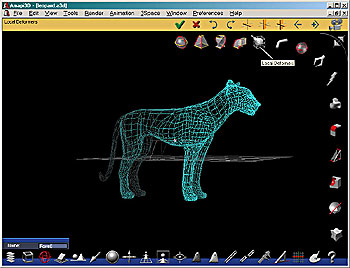
Figure 1: Amapi’s unusual workspace is both friendly and visually interesting.
The Construction palette contains the tools you need to generate basic shapes such as geometric primitives, text, extrusion, sweeps, and surfaces. The tools in the Modeling palette let you edit objects by deforming, stretching, smoothing, beveling, adding surface relief, and so on. The Assembly palette is used to position objects and organize them in relation to each other. For example, you can weld objects into single entities, snap them together, and unfold a three-dimensional object into a two-dimensional one. Like Carrara Studio’s Object Browser, Amapi’s Catalog is where you manage and organize the entire scene and houses the Materials library (see figure 2). We found the unusual interface quite simple to learn, thanks, in part to the excellent set of tutorials in the manual.

Figure 2: The Catalog’s Object and Materials tabs let you page through libraries of models and textures, both of which can be dragged and dropped into the current document.
Creating objects is much more precise in Amapi than in Carrara — you’ll always see a set of axes for pinpoint placement, which we think makes it far easier to arrange objects than by using Carrara’s projection planes. Although Amapi lacks a metaballs modeler, the program’s modeling tools, are more sophisticated than Carrara’s. The complex Boolean operations allow for the creation of much more intricate objects and Amapi can easily bevel solid edges with the Chamfer tool. Amapi also supplies esoterica such as the ability to generate surfaces from connected curves (Coons surfaces), an arrangement of 3D curves (Gordon surfaces), and three connected curves each lying on a different main plane (Hull surfaces). And Amapi supports the construction of objects in either polygonal (where objects are defined by polygonal facets) or NURBS (where objects are defined by curves) mode.
We admit that we like Carrera’s easy Storyboard feature for creating animations, but Amapi’s 3Space Dynamic Editor is just as compelling (see figure 3). Once you’ve constructed a scene, you can use this editor to describe the environment, for example, whether the objects in the scene are subject to gravity or if fog is present. You can then assign actions and behaviors to objects and set trigger events. For example, you can create a pool table and use 3Space to build a realistic interactive game that can be played over the Internet.
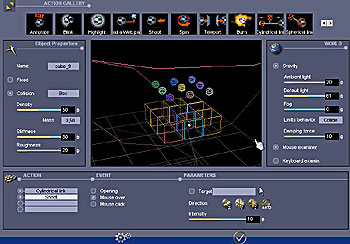
Figure 3: The 3D Dynamic Editor lets you drag and drop physically realistic behaviors and actions onto objects in your scene.
Amapi ships with several hundred sample models and a nice library of textures. If you are in the market for a 3D modeling program that offers ease of use, precision modeling tools, and features for Web animation, this program will fill the bill and not empty your wallet.
This article was last modified on March 13, 2022
This article was first published on April 12, 2002
Commenting is easier and faster when you're logged in!

Recommended for you

Secrets of the Esc Key
If you’ll pardon the pun, the Esc key might escape the notice of many Adob...

FourMatch, the lie detector for photos
Back in June, I wrote a story on a new company that was developing software for...
How to Increase Image Dimensions and Maintain Quality in Photoshop
Learn best practices for increasing dimensions of an image while maintaining as...