


Painter 7 Lays It on Thick


From its inception Painter has been the vanguard of cyber-artistry. Its natural-media brushes remain unrivalled in both breadth and sensitivity, making the transition from real paint to e-paint almost painless. Every upgrade has added an abundance of terrific toys, and version 7 is no exception. For starters, there’s the new Liquid Ink natural-media tool, which behaves like a goopy, viscous liquid. It can be applied as either a positive or negative (and resistive) medium, simulating such diverse techniques as enamel, encaustic, and wax-resist. By adjusting a variety of parameters, you can soften the edges of the goo and cause discrete strokes to coalesce — kind of like drawing with molasses but much more engaging.
More cool stuff awaits the watercolor artist. A new sub-palette in Brush Controls adds advanced controls over watercolor effects such as diffusion amount, evaporation threshold, and diffusion. A common practice in watercolor is blowing on the paint to spread it in a particular direction, and the new Wind Direction control let us imitate this technique with amazing precision. Both watercolor and liquid ink are implemented as separate media layers.
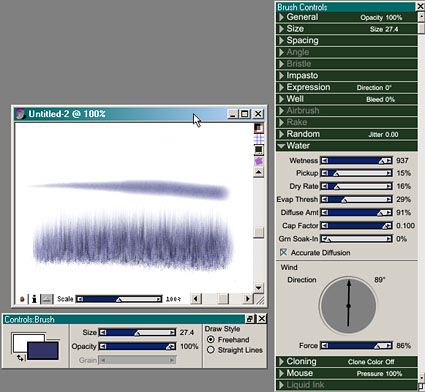
The top stroke is plain-vanilla; the bottom stroke shows what happens when the new Wind feature for watercolor is applied.
The more-structured artists who rely on perspective grids to create three-dimensional images will be happy to see this feature in Painter 7. The Perspective Adjustor tool lets you tweak the grid spacing, adjust the location of the vanishing point and horizon lines, and turn on vertical lines, horizontal lines, or both. We found this feature especially helpful for getting perspective text just right, but painters who lightly sketch perspective lines before applying media will also find this non-printing grid a godsend.
A Better UI
At first glance, Painter’s interface looks untouched, but when you dig a little deeper you see a number of improvements that make it easier to master this complex application. A new command in the Preferences menu lets you decide which options display in the Art Materials, Brush Controls, and Objects palettes. For example, if you don’t use the Art Materials Weaves or NetPainter features, you can unclutter the workspace a bit by hiding them. Moving around the image is easier, too, thanks to the continuous- and variable-zoom features that replace the fixed-magnification increments in earlier versions. We also noticed the Corel look and feel slowly creeping into Painter (Remember, Corel purchased Painter and several other titles from MetaCreations in April of 2000): Many of Painter’s teeny text buttons have been replaced with nice, large, Corel-standard icons, such as Search, Add, Subtract, and Lock.
Painter defines literally hundreds of keyboard shortcuts, and version 7 adds a few more for layer navigation. Some of the old shortcuts have been modified, too. For example, in version 6 (Windows) Ctrl-click subtracts from a selection; in version 7, the command is Alt-click. The shortcuts are more in line with those in Photoshop, but unwary users might become befuddled (and annoyed) if they aren’t aware of the changes. There’s still no way to modify the shortcuts yourself, though you can assign menu and palette menu commands to function keys.
This reviewer was thrilled to discover Painter’s new right-button (CTRL-click on the Mac) context menus — easily my favorite new feature. If you are using the Selection tool, for example, the right mouse button displays options such as Select Inverse, Feather, Save Selection, Fill, and Stroke.
Another big UI improvement is the ability to create color sets from an image, active layer, or current selection. In earlier versions, we had to use the Eyedropper tool and pick up each color individually. In version 7, a button in the Color Set palette generates a new palette automatically. Too bad only one 256-color palette can be open at a time; that feature will begin our upgrade wish list for version 8.
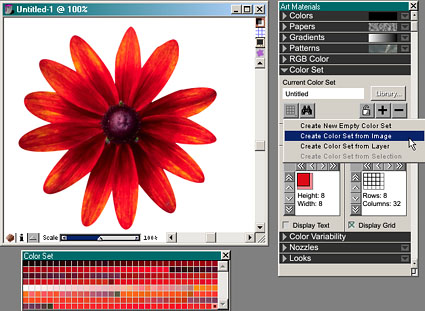
With a single button, you can now generate a color set from an image, layer, or selection.
Finally, Corel has merged the Dynamic Text plug-in and the Text tool into one palette that users of other Corel software will find familiar. The palette contains controls for font, alignment, point size, tracking, leading, shadow style, and curve format. It’s neat and convenient, but none of our PostScript fonts appeared in the font list on our test system. Corel is looking into the problem but assures us that PostScript fonts are supported.
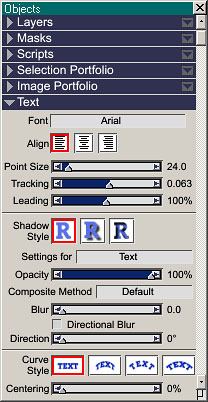
The new Text palette presents all of Painter’s text functionality in one place.
This article was last modified on July 20, 2021
This article was first published on August 1, 2001
Commenting is easier and faster when you're logged in!

Recommended for you

Prepress Training Solution Adds More Font Management Tutorials to Online Library
Prepress Training Solution, (PTS), the premier online training provider to the g...

How to Straighten Photos Taken at an Angle
It’s hard to photograph many images head-on. For example, if you try to shoot a...
100 Most Important Cameras in History
If you didn’t get exactly what you wanted for the holidays, here’s a treat you c...