


Photoshop How-To: Blur a Picture to Bring It Into Focus


This excerpt courtesy Mark S. Johnson Photography and Radiant Vista
Sharpness in a photo can be too much of a good thing when a sharp background distracts the viewer from your intended subject in the foreground. By blurring the background using one of two techniques (one basic, the other advanced), you’ll change the apparent depth of field and make your image more effective.
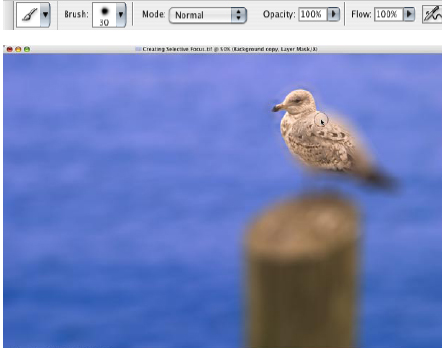
A busy background originally competed with the gull.
To get you started, the author has supplied a sample photo just right for these techniques. Click on the link below to save the image to your computer.
We’ve posted this excerpt as a PDF file. To open the PDF file in your Web browser, click “Selective Focus.” You can also download the PDF to your machine for later viewing.
To open the PDF, you’ll need Adobe Acrobat or Adobe Reader. To download Acrobat Reader click below:
 .
.
To learn how to configure your browser for viewing PDF files, see the Adobe Reader tech support page.
Note that this excerpt is part of a larger ebook on photographic techniques. For more about the Photographer’s Photoshop CS2 Companion, see Mark’s bookstore.
This article was last modified on January 3, 2023
This article was first published on May 15, 2006
Commenting is easier and faster when you're logged in!

Recommended for you

Adobe's Guide to Tuning Photoshop for Peak Performance
If you do a lot of Photoshop work, it behooves you to spend some time to configu...

Special Offer on JixiPix Photoshop Plug-ins
Press release JixiPix Software has released the availability of a whole new powe...

Thou Shall Not Use Comic Sans
Excerpted from Thou Shall Not Use Comic Sans: 365 Graphic Design Sins and Virtue...