


Photoshop How-To: Let There Be Light


 Excerpted from “The Photoshop Channels Book.” Published by Peachpit Press.
Adding a ray of light to the correct type of photo (one in which seeing a ray of light coming in through a window would make sense) can take it from boring to beautiful.
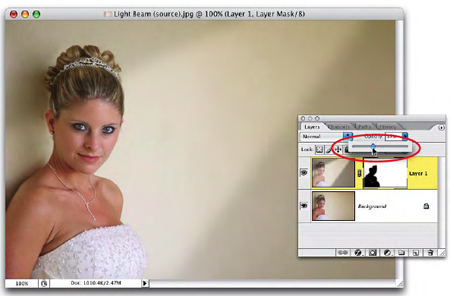
Without the light beam, this photo was only so-so.
In this tutorial, Scott Kelby will take you through drawing a light beam using the Polygonal Lasso tool; blurring the resulting Alpha channel to soften the beam’s edges; and placing the beam so it’s either covering your subject or casting onto a wall behind the subject.
We’ve posted this excerpt as a PDF file. To open the PDF file in your Web browser, click “Let There Be Light.” You can also download the PDF to your machine for later viewing.
To open the PDF, you’ll need Adobe Acrobat or Adobe Reader.
To learn how to configure your browser for viewing PDF files, see the Adobe Reader tech support page.
Excerpted from The Photoshop Channels Book by Scott Kelby. Copyright © 2006 Scott Kelby. Used with permission of Pearson Education, Inc., and Peachpit Press.
This article was last modified on January 3, 2023
This article was first published on May 24, 2006
Commenting is easier and faster when you're logged in!

Recommended for you

Simplify Your Photoshop Workflow With Layrs Control
The Adobe Exchange panel is a great resource for finding and installing free goo...

Illustrator CC 2018 New Features
Adobe Illustrator CC 2018 brings several exciting enhancements, including Variab...
Crafting Chromatically Rich and Luminous Images
“If all the world’s a stage, I want better lighting.” I couldn’t agree more with...