




This story is taken from “Real World QuarkXPress 6.”
It’s a common situation: You’re asked to design a display ad that will appear in print at three different sizes and on the Web in two different sizes. Instead of creating five different files, wouldn’t it be easier to create one master file that contains all those different orientations? That’s what the multiple layout spaces option in QuarkXPress 6 is for. With it, you can keep related files together and manage their assets — graphics, color palettes, type styles, etc. — between them.
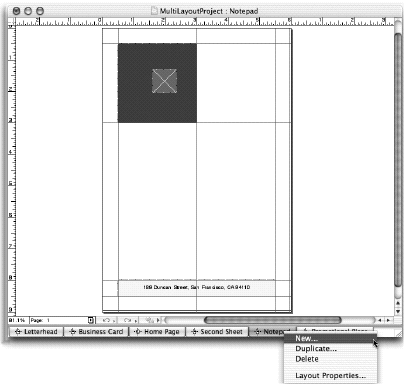
InQuarkXPress 6, linked document files are called a project. As might be expected, there are tricks for using this new feature effectively. In this excerpt from “Real World QuarkXPress 6,” David Blatner fills you in on what makes projects and layout spaces tick.
We’ve posted this excerpt as a PDF file. All you do is click this link “Projects and Layouts” to open the PDF file in your Web browser. You can also download the PDF to your machine for later viewing.
To open the PDF, you’ll need a full version of Adobe Acrobat (4 or higher) or the Adobe Reader, which you can download for free..
To learn how to configure your browser for viewing PDF files, see the Adobe Reader tech support page.
Excerpted from “Real World QuarkXPress 6” © 2004 David Blatner. Reproduced by permission of Pearson Education, Inc. Publishing as Peachpit Press. ALL RIGHTS RESERVED.
This article was last modified on January 11, 2022
This article was first published on November 12, 2003
Commenting is easier and faster when you're logged in!

Recommended for you

Veer Introduces Fancy Deluxe Royalty-free Photography
Veer, a provider of visual elements and design-related products, today announced...
Enter Your Folded-Paper Project To Win Prizes
Foldfactory.com is searching the globe in a first-of-its-kind “Folded Insp...

Preflighting eBooks for Overrides
With the help of the Preflight panel, a plug-in, or a cool script, you can spot...