


QuarkXPress 6 Tips: Working with Layers


The ability to work with layered files was an important addition to QuarkXPress 5, and with version 6, Quark added some small but significant improvements to this valuable feature. In fact, some publishing pundits assert that the layer functionality of QuarkXPress is superior to that found in Adobe InDesign.
Not every needs to use layers, of course, but once you’ve incorporated them into your workflow, you’ll wonder how you’ve ever done without them.
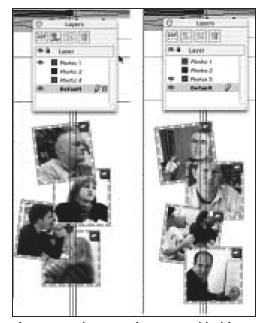
In this excerpt from “QuarkXPress 6 Bible,” you’ll see how layers work and how you can put them to work for you.
We’ve posted this excerpt as a PDF file. All you do is click the link “Working with Layers” to open the PDF file in your Web browser. You can also download the PDF to your machine for later viewing.
To open the PDF, you’ll need a full version of Adobe Acrobat (5 or higher) or the Adobe Reader, which you can download here:
 .
.
To learn how to configure your browser for viewing PDF files, see the Adobe Reader tech support page.
Excerpted from “The QuarkXPress 6 Bible” by Galen Gruman and Barbara Assadi. Copyright © 2003 Wiley Publishing. All rights reserved. Reproduced here by permission of the publisher.
This article was last modified on January 11, 2022
This article was first published on March 19, 2004
Commenting is easier and faster when you're logged in!

Recommended for you

Getting Started with GREP Styles in InDesign
Harness the power of GREP styles to apply automated styling in your work
New Type Walking Tours for 2006
The walking tour of typographic London, introduced by Typevents in the autumn of...

The Benefits of Online Proofing for the Creative Workflow
The volume and speed of creating and approving marketing collateral have become...