



Press release
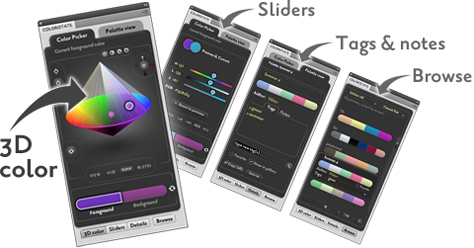
ColoRotate is a plug-in that replaces Photoshop’s color picker with a 3D color picker that lets you create color palettes effortlessly because it matches how our minds understand color. Plus, ColoRotate’s slider controls and joysticks provide more ways to manipulate your colors. With an optional “ColoRotate Cloud” subscription, you can also sync colors between computers and share with colleagues, collaborators, or clients.
The ColoRotate plug-in for Photoshop CS4 is $39 for a limited time. Enhance the plug-in by subscribing to ColoRotate Cloud:
* Link your plugin to your online account.
* Sync palettes between multiple computers.
* Share palettes with colleagues, collaborators, or clients.
* Only $49/year! (For a limited time.)
Purchase ColoRotate.
ColoRotate is a project of IDEA, a nonprofit organization that helps improve scientific and artistic literacy. The plugin and cloud subscription are intended to help people use and understand colors based on the science of color perception. Your purchases and subscriptions support IDEA’s ongoing research and public education activities.
This article was last modified on January 18, 2023
This article was first published on January 6, 2010
Commenting is easier and faster when you're logged in!

Recommended for you

Heavy Metal Madness: Decalcomania Mania
One of my favorite specialty printing methods is that of the water-transfer deca...

Lightroom 5 Round-up
Adobe’s Lightroom 5 was released this week with a number of new features includi...
Create Amazing Computer-Generated Art With Amberlight
Amberlight is an app for Windows and Mac from Escape Motions (makers of Fla...