



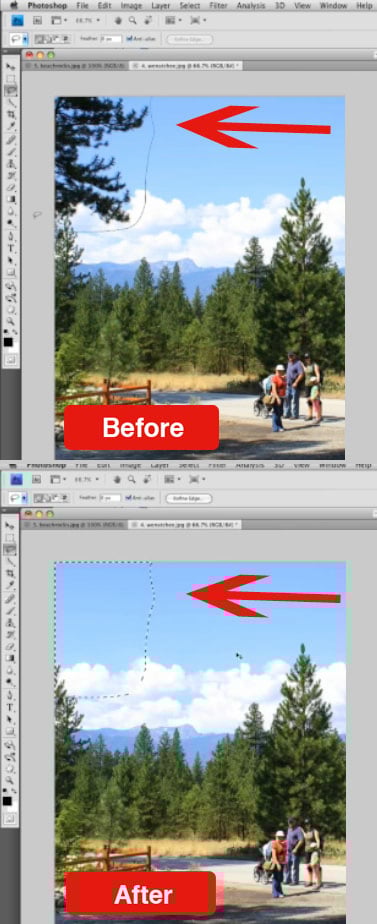
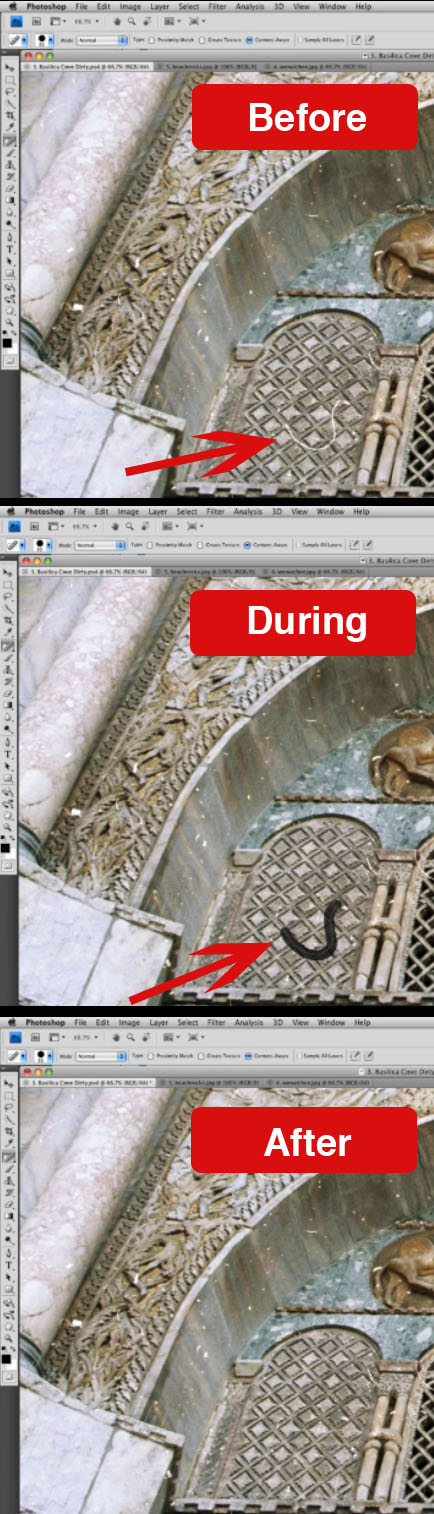
A four-person team (Connelly Barnes and Adam Finkelstein of Princeton University and Eli Shechtman and Dan B. Goldman of Adobe Systems) have been working on technology that fills in parts of an image you edit out more intelligently than Photoshop CS4’s Spot Healing Brush and Edit/Fill commands. The result is a “new randomized algorithm for quickly finding approximate nearest neighbor matches between image patches.”
Sound boring? Wait till you see it in action in a video on Adobe’s Facebook page. In the meantime, check out these before-and-after from the video:
This article was last modified on December 14, 2022
This article was first published on October 22, 2009
Commenting is easier and faster when you're logged in!

Recommended for you

Making Lightweight Animated GIFs in Photoshop
Still images can look great on websites – but moving images are more atten...

Designing A Logo for Every Size & Usage
Designing a typographic logo, or word mark, isn’t as simple as coming up with on...

Develop Your Photography Skills Each Week with The Practicing Photographer
If you want to be great at anything, whether it’s baking bread, shredding...