



Press release
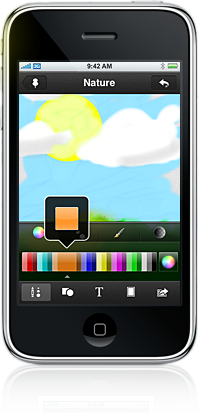
Would you like to jot down notes on your iPhone’s gorgeous touch screen? Are you missing a way to sketch a simple diagram as a quick reminder? Will your children like to draw on your iPhone, maybe on top of a picture you shoot with the camera? Sketches from LateNiteSoft is a $1.99 iPhone application that will allow you to do all that. Jot down your notes, scribble your thoughts and annotate your pictures using only your fingers and your imagination! Illustrate your ideas with simple but colorful diagrams, notes and sketches.
Place shapes using multitouch gestures, zoom in for those accurate little details, save your creations in your personal corkboard or send them to others. Use Sketches for business, creativity or simply share it as a pastime with your friends.
* Easily sketch your ideas using the predefined shapes, or use the artistic brushes to draw by hand.
* Fast and simple color selection, as well as an advanced color picker.
* Natural, fast zooming and panning.
* Great selection of clipart to annotate or decorate your drawings. Adjust size, position and rotation using natural multitouch gestures.
* Create your own text shapes using one of the available fonts.
* Change the background layer of your drawing at any time: shoot a picture, capture a map or choose among the built-in background library.
* Create directions for your friends showing your current location in satellite, map or hybrid mode.
* Eraser, undo, redo and revert options.
* Device aware: Sketches 2 recognizes what device it is running on and will adjust for performance and capabilities.
* Export your work to the photo album, share it via twitter or email, or download your drawings to your computer in PDF (full vector format), JPG or PNG.
Sketches 2 is available through the App Store in iTunes and your device.
This article was last modified on January 18, 2023
This article was first published on December 28, 2009
Commenting is easier and faster when you're logged in!

Recommended for you

Ultimate and Enfocus Join Efforts To IntegrateLeading Imposition Software Into PitStop Automate
Enfocus is rapidly expanding its Technology Partner Program introduced at IPEX 2...
WhatTheyThink.com Launches Printing Industry Blog
WhatTheyThink.com, the leading online media organization serving the printing an...

Huge Yellow Tool Tips Bugging You?
When you’re in InCopy’s Layout view, or anywhere in InDesign’s...