



When I pitched the idea for this article to my editor, I thought it would be an easy assignment. Was I wrong! There are so many cool, useful, and free online tools that it was tough to pare the list down to only 10. I first narrowed the list to those tools with the greatest utility and broadest appeal. When that still left me with a long list, I threw darts. The results are below.
1. Lorem Ipsum Generator
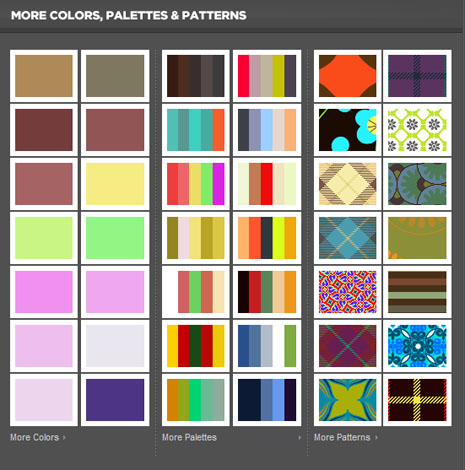
InDesign, InCopy, and QuarkXPress have built-in filler-text generators, but they only do paragraph type (without some work on your part). Moreover, few other design tools generate placeholder text. That’s why I use the Lorem Ipsum Generator. Available free and in 32 languages, the Lorem Ipsum Generator will produce placeholder text of any length you want simply by specifying the number of paragraphs, words, bytes, or lists.
2. Color Inspiration and Community
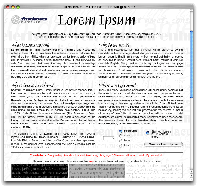
Before Adobe’s Kuler there was — and still is — Colour Lovers. Colour Lovers is similar to Kuler in that you can create, share, and discuss color palettes. Both let you create color palettes from scratch or from an uploaded image, and then tag, share, and discuss your palettes and others’, but Colour Lovers boasts even more impressive features.
The second biggest advantage of Colour Lovers is the inclusion of patterns: Not only can you create and share colors and palettes, but also patterns of colors, many of which were inspired by palettes shared in the community. Enhanced search capabilities make it easier to find colors, palettes, and patterns by hue, Web Hex color value, date, keyword, and popularity.
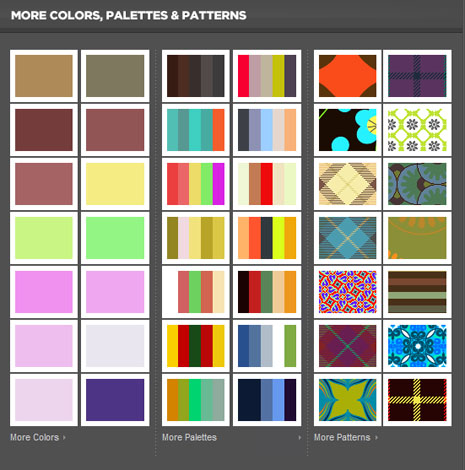
Colour Lovers’ biggest advantage over Kuler is the ability to download palettes not only in the Creative Suite-specific Adobe Swatch Exchange ASE format, but also as a Photoshop, Illustrator, or GIMP document, and HTML file listing the colors in Web Hex values, or even a Zip archive. Kuler offers only the ASE format.
Although Kuler boasts a better color mixing interface, the extra features of Colour Lovers nudges it ahead of Kuler in my (swatch) book.
3. Invoicing and Billing
FreshBooks is free invoicing and invoice tracking service. You can send invoices via e-mail or have FreshBooks print and snail mail them. The basic account is free and allows you to manage three clients concurrently, but e-mails you send through the system are branded with an ad for FreshBook itself.
To get rid of the ad, increase the number of clients you can manage, or number of individuals in your organization who can access the account, you’ll need to upgrade to a paid account. Prices range from as little as $14 per month for 25 clients and one staff member account on up to the “Time Machine” plan of 5,000 clients and 20 staff members for a still very reasonable $149 per month.

4. Online Meeting, Collaboration, and Document Sharing and Proofing
If I had written this article last year I would have had to pay for competent online tools for online collaboration, white boarding, document proofing, and approval. This year a single free service addresses all of those needs, and it does so very well.
Acrobat.com, released concurrently with Acrobat 9, includes a quartet of very powerful tools.
In Buzzword, you can create and invite others to view or contribute to word processor documents. I’ve come to love Buzzword because of the ease with which it facilitates collaboration with clients and partners. In particular, it’s useful for creating to-do or Q and A lists that multiple parties can change at any time. You can even export Buzzword documents to the desktop in a variety of standard word processor formats (and PDF, of course).
ConnectNow (see below) is Acrobat.com’s online meeting and screen sharing service. Invite clients, colleagues, or remote employees to meet live and share files, screens, and a whiteboard while conversing via integrated text chat, audio via computer microphone or telephone, and even Web cam video, all for free.

Do you want an easy way to share proofs and large files with clients without worrying about e-mail attachment limits or walking clients through the process of using your FTP server? Every free Acrobat.com membership includes 5GB of file storage (see below). You can access your own files again from any Web browser, but more importantly, you can also instantly share any uploaded document with others. Although there are file-sharing services out there with larger capacities and more advanced versioning, it’s the clean and intuitive user interface, as well as the tight integration with the other Acrobat.com services that puts the free My Files and Share services top of my list.
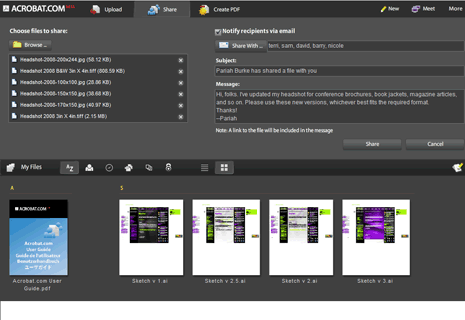
A bonus fifth feature of Acrobat.com is the free conversion of various file types to PDF. If you don’t have Acrobat on hand, upload your file to the site and download a PDF.
5. Project Management
Liquid Planner is a hosted project-management application that includes project scheduling and analysis; task management; resource scheduling; milestones; drag-and-drop ordering of priorities and tasks; integrated e-mail and other communication tools; personalized dashboards; and more. Like many such services there are paid plans, but the free plan might do you with a respectable 2GB of file storage, up to three team members, and an unlimited number of projects and tasks.

6. Understanding Your Pay Rate
How do you know if you’re being paid what you’re worth? What is the average pay rate for someone in your position, at similarly sized organizations, in your city or region? Would it benefit you to move? Find the answers to these and other burning questions with the ultra useful Design Salary Calculator. Choose your position, type and size of organization, client base, and location(s) to generate a report based on the information AIGA, Aquent, and Communication Arts magazine collect annually from 50 thousand of our creative peers.

7. File Storage and Synchronization
You may be surprised to find a Microsoft service among a list of ten free online tools every designer should know about, but I swear by the free Windows Live FolderShare service for Windows and Mac. I’ve been using the service for years now, since before Microsoft bought it.
FolderShare is a complete solution for keeping two or more computers in
synch — in total or just specific folders — as well as for sharing documents with individuals and accessing the files on any of your computers from any place with an Internet connection.
Setting up is as easy as 1-2-3: Create a free account on FolderShare.com; install the tiny desktop client software for Windows or Mac; and register each computer through the FolderShare client. Your computers will automatically appear in your secure account screen. Now you can explore and download any file from any of those computers through the FolderShare.com Website. As long as your host computer is turned on, connected to the Internet, and running the FolderShare client in the background, you can access any file on the system remotely from any computer — through a browser, without the need to install the client software all over town.
FolderShare’s remote file access has saved my butt more than once. Occasionally during a presentation or consultation I discover that I need something from my always-on main workstation back home. Rather than tell the client “I’ll have to e-mail it to you,” I fire up a Web browser, log into FolderShare.com, and download what I need directly to my laptop or the client’s computer.
Equally as valuable is the ability to automatically synchronize files between two or more systems running FolderShare client software. Pick the folders to mirror via FolderShare.com and set automatic synchronization. Done. As long as your computers are on, online, and running the FolderShare client, selected folders (or entire drives) can be synchronized with each other in the background. I, for instance, keep the folders containing my font library, in-progress articles, client projects, accounting, and other files in synch across all four of the computers on which I might need to use or work with those files. Whether I’m home working on a desktop system or on the road with a laptop, I always have the latest version of everything I need with me.
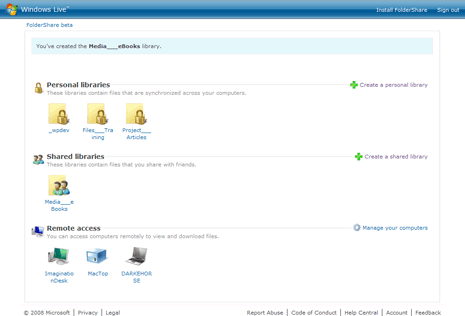
Finally, FolderShare offers a way to share your computer files with others. The Shared Libraries feature allows you to pick one or more folders to share with different people, and you can give those people different permissions — view-only, add files to the library, delete files from the library, and/or change files in the library. Unlike online file sharing services, the files you share don’t go to Microsoft’s servers; they stay on your computer, accessed by other through the secure tunnel of FolderShare.com and the FolderShare client.
8. Covering Your Assets
Every week in online design communities, I see the same questions:
“Can I copyright this?”
“What is ‘Fair Use’?”
“When is my work copyrighted?”
“How long does copyright last?”
“Do I own the copyright in this scenario or that?”
“Should I register for a copyright?”
and so on.
More importantly, I also see wrong or incomplete answers to those questions. When we’re talking about your work — your creations, your competitive edge, your livelihood — and when following bad or incomplete advice can so cause you to lose some or all rights and control over your own creations, competitive edge, or livelihood, are you sure you want to listen to advice from Joe Nobody in a design forum?
Get the real facts about copyrights from the horse’s mouth: the United States Copyright Office. Free and easy to digest online guides explain in plain English — not legalese — the basics about copyright, who owns what when and for how long. After the basics you can delve as deep as you want into specific questions like issues related to the Fair Use Doctrine and copyright protection across international boundaries.
Considering registering your work for federal copyright protection? Online tools help you search the registration database for possibly similar works and submit your copyright registration.
9. Font Identification
Do you ever have to identify mystery typeface used in someone else’s logo or design? Save yourself hours of scrolling through a font manager or squinting at type spec books with the free What The Font typeface identification service.

Upload a decent-quality black and white image containing type and this hosted service will do its darnedest to identify the font (and provide a convenient means of purchasing it). Identification isn’t always perfect, but it’s surprisingly accurate for an automated system. You can also request human font identification assistance for a small fee.
10. Free Stock Photos
No list of 10 free online tools every designer should know about should be without a free stock photo resource. I know of several such resources, but the Morgue File is a good first stop. It contains thousands of high-resolution digital stock photos that are completely free for either public or corporate use.

Search for photos and/or illustrations, by keyword, phrase, author, or date, and then download them — no muss, no fuss. The Morgue File even includes lightbox functionality like the big paid stock photo sites, all for free.
It Doesn’t End Here
Do you have suggestions for other free online tool? Leave them in the comments on this article. And let me know if you’ve tried any of the tools recommended in this article. You can share your experiences publicly in the comments, or contact me directly through my Creativepro.com author profile page.
This article was last modified on January 18, 2023
This article was first published on November 10, 2008
Commenting is easier and faster when you're logged in!

Recommended for you

The Illustrious (& Illustrative) World of Cipe Pineles
Cipe Pineles blended colorful illustrations and hand lettering in her influentia...

TypeTalk: How Posters Work, by Ellen Lupton
How Posters Work is not only a beautiful catalog of famous posters, but also an...

Typography Playing Cards
If you’re pondering what to get your favorite type nerd for the holidays,...