The Darkroom Makes a Comeback (Part 2)

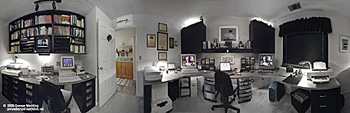
In this second of his two-part article, George Wedding outlines the steps necessary to convert an everyday office into a workspace that promotes color accuracy.
Written by George Wedding on March 6, 2001

Related Reading

Shade Windows to Eliminate All Extraneous Light
Controlling the effects of ever-changing window light is an essential first step. The goal here is simple: to establish and maintain room lighting at a constant level and white point throughout the day.

If necessary, use flat-black mini-blinds; a dark, neutral-colored decorative valance; and window sills painted a flat black to reduce the amount of light entering the room through each window. Even these steps may not fully resolve the problem, and patches of sunlight may stream through. In a pinch, a fabric sunscreen can be attached to the exterior of some windows to block up to 75 percent of the sunlight entering a room. These tightly woven, wire screens also add privacy and security, since they help keep someone outside from seeing your valuable computer equipment. In worst-case scenarios, you may have to paint window panes a flat black paint or block them with masks such as foil or black matte board.

In many cases, no single idea will work alone and you may have to combine several techniques to sufficiently mask your windows. Unlike a chemical darkroom, the windows in a "digital" darkroom do not have to be blacked out completely, but most of the natural light should be eliminated.

Of course, you should avoid placing your monitor in front of a window unless the window is heavily shaded as indicated above. Otherwise, as you sit facing the window to look at the monitor, you'll constantly have problems both adjusting to the contrast between the monitor and sunlight and judging contrast values in images on the monitor. If the monitor glass is oriented toward the window, reflections will be problematic. Instead, orient the monitor so that the front glass is at a right angle to windows. And of course, shade or mask those windows if at all possible.

Paint Editing-Room Walls a Color-Neutral Light Gray
Experts recommend a color-neutral light gray of about 60-percent reflectance. Latex paint for labs is available from Graphic Technology Inc. of Newburgh, NY. Alternatively, you can have your local paint supplier mix a custom formula to match N8/ gray from the Munsell Books of Color. Paint manufacturers occasionally change formulas, but here are two (compiled in late 2000) to consider.

California photographer Jack Kelly Clark recommends mixing one gallon of Pittsburgh Paint's pastel-tint white base #80-110 with Lamp black (B-12/48 PPG*); Raw Umber (L-36/48 PPG); and Permanent Red (O-3/48 PPG). Write those numbers down and take them with you to the paint store if you want to try the mix yourself.

A similar Kelly-Moore Paint Co. formula from photographer John Palmer uses a pastel-tint white as a base with three colors to create an interior, flat latex similar to Munsell 8 gray: Lamp black (4/48 PPG), Raw Umber (27/48 PPG), Violet (2/48 PPG).

Eliminate Bright Colors from the Room
Get rid of brightly lit (or colored) objects in the field of view directly behind your monitor, particularly if you go to the trouble of painting your walls neutral gray. Some professionals further refrain from wearing brightly lit clothing that could reflect into the monitor.

You should also avoid using brightly colored pictures as your computer desktop background or wallpaper. Use Adobe Photoshop or another image editing program to create a simple gray image file.

1

anechoic wall covering

One suggestion I would like to add is to cover a substantial portion of the wall area with dark grey anechoic foam panels. A room full of computers and perripherals has many small cooling fans (mine has 19 units with fans) all of these emit a substantial ammount of high frequency white noise which over time can lead to hearing loss and in the short-term is stressful. I purchased zig-zag cut anechoic panels from an audio sound studio products catalog and covered my upper walls with 2ft x 4ft panels spaced about 6" apart. Besides substantially reducing the noise it looks way cool and high tech. And, yes, it is neutral gray ...but somewhat darker than your specification. It is a bit pricy..but all the good stuff is.

2

Lighting levels and eyesight

Your observation about declining eyesight is an issue, but some things, like aging, are unavoidable. I'm a 48-year-old Mac user and my eyesight deteriorated to the point that I needed glasses by the time I was 43, which my doctor said was 'normal' in today's population. While I have some trouble with bright lights or discerning shadow detail these days, the fact remains that lowering the lights in my editing room has dramatically improved my ability to work with images on computers. Do I keep a flashlight handy to find something dropped under a table or occasionally turn up the lights to do routine tasks like filing? Yes -- whatever is necessary to make things work.

3

Good article, but one question...

I understand the need for the correct lightin conditions coming from a background of photography, but what about my eyes? I have been using a computer for my artwork for over 2 years now and have noticed my eyesight suffer, won't these new measures (if implemented) be bad for us?

4

Despite this article being 8

Despite this article being 8 years old, It is still spot on. Thanks for the education.online black jack forex trader on line craps on line roulette on line bingo

Post a Comment

  • Allowed HTML tags: <a> <em> <strong> <cite> <code> <ul> <ol> <li> <dl> <dt> <dd> <p> <div> <br> <center> <img> <h2>
  • Lines and paragraphs break automatically.
  • Use <!--pagebreak--> to create page breaks.

More information about formatting options

CAPTCHA
This question is for testing whether you are a human visitor and to prevent automated spam submissions.
Image CAPTCHA
Copy the characters (respecting upper/lower case) from the image.