




Helen Bradley has written a thorough tutorial on using Photoshop to create kaleidoscope patterns from any photo with interesting color and shapes.
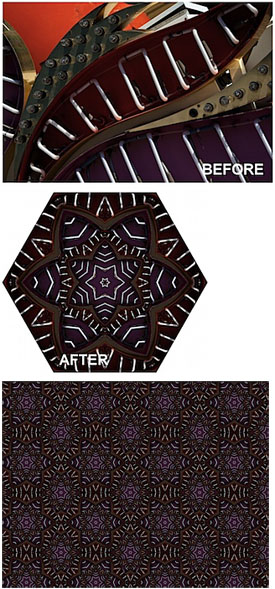
To read the tutorial, head to the Digital Photography School Web site.
This article was last modified on December 17, 2022
This article was first published on November 5, 2009
Commenting is easier and faster when you're logged in!

Recommended for you
Improve Your Talent for “Eyeballing It”
I’m kind of a stickler for neat and tidy layout; blame it on my printing b...

Creating Latte Art With Pixelmator
As a Photoshop user, you’re no doubt used to being asked to perform the im...

How to Shoot Raw Photos on Your iPhone (and Why You’d Want To)
You don’t need a DLSR camera to reap the benefits of the raw image format.