


Web Design Tips: Using Graphic Elements to Persuade Customers

This story is taken from “Submit Now: Designing Persuasive Web Sites.”

New Riders is offering this book to creativepro.com readers at a special discount. Click here to learn more.
It’s one thing to slap togther some HTML and a few GIFS and call it a Web page. But creating a Web site that invites interaction take a bit more planning, especially if you have goods or ideas to sell. In that case, having a usable site isn’t enough. You need to make it persuasive as well.
Graphic elements are just two ways in which you can convert visitors into customers. For example, images sell goods and buttons facilitate purchasing.
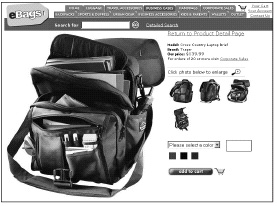
In these excerpts from “Submit Now: Designing Persuasive Web Sites” you’ll learn how to present images and design buttons for your Web pages that invite transaction as well as interaction.
We’ve posted these stories as PDF files. All you do is click these links “Pictures that Sell” and “Buttons” to open the PDF files in your Web browser. You can also download the PDFs to your machine for later viewing.
To open the PDF, you’ll need Adobe Acrobat Reader. Get it here:
 .
.
To learn how to configure your browser for viewing PDF files, see the Adobe Reader tech support page.
This article was last modified on January 3, 2023
This article was first published on August 27, 2003
Commenting is easier and faster when you're logged in!

Recommended for you

Decimal Align Numbered Lists
Abbe wrote: I like to use InDesign's auto-numbering feature, but don't see a way...

How to Create a Pie or Ring Chart in InDesign
Learn how to create a pie chart or a ring chart right inside of InDesign with th...

The Creative Toolbox: Better Selecting in Adobe Illustrator
Learning to use Illustrator's selection tools, layers, and the Lock, Hide, and S...