


Web How-To: Making Your First Flash MX Project


Macromedia Flash is as pervasive in Web sites of the 2000s as PostScript was to print projects during the 1990s. According to Macromedia, 97 percent of all Web-using desktop computers have the Flash Player installed. If you design or produce Web sites, you need to be familiar with Flash — its technical underpinnings as well as its interactive capabilities.
But making Flash animations and interactive elements requires a different way of thinking, not to mention another set of tools. If you’re accustomed to coding in HTML or if you’re a print designer looking to forge new directions, it’s time you got started with Flash.
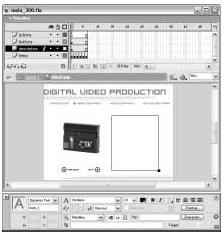
This step-by-step tutorial will take you through the process of making your first Flash project in Flash MX or Flash MX 2004. Familiarize yourself with certain tools first, then follow along to learn how to put the elements together.
We’ve posted this excerpt as a PDF file. All you do is click the link “Making Your First Flash MX Project” to open the PDF file in your Web browser. You can also download the PDF to your machine for later viewing.
To open the PDF, you’ll need a full version of Adobe Acrobat (4 or higher) or the Adobe Reader, which you can download here:
 .
.
To learn how to configure your browser for viewing PDF files, see the Adobe Reader tech support page.
Excerpted from “Adobe Acrobat 6 Bible” by Ted Padova. Copyright © 2003 Wiley Publishing. All rights reserved. Reproduced here by permission of the publisher.
This article was last modified on January 8, 2023
This article was first published on February 11, 2004
Commenting is easier and faster when you're logged in!

Recommended for you

An Introduction to Actions in Illustrator
Learn how to automate repetitive tasks to save your time for being creative.

12 More Experts Confirmed to Speak at CreativePro Week 2021
We’re excited to announce 12 more speakers have been confirmed to join us online...

Editor’s Picks for The Design + AI Summit 2025
Our Editor in Chief lists his must-see sessions for The Design + AI Summit 2025.