


Web How-To: Planning Flash Projects


Perhaps you’re just learning to create Flash animations. Perhaps you’ve already mastered the mechanics of Flash. Either way, before you jump willy-nilly into making that flashy Flash-enabled Web site, you need to think about what are its goals and objectives. You need to think about who its audience is and how they will use it. You need to think about how visitors will navigate from one place to another.
In other words, you need to plan your project.
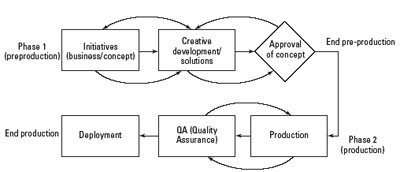
In this excerpt from the “Macromedia Flash MX 2004 Bible,” you’ll learn what questions to ask and what solutions to propose when creating a Flash project. Along the way you’ll pick up tips on what makes a good user interface and how to use Flash’s Project Panel.
We’ve posted this excerpt as a PDF file. All you do is click the link “Planning Flash Projects” to open the PDF file in your Web browser. You can also download the PDF to your machine for later viewing.
To open the PDF, you’ll need a full version of Adobe Acrobat (5 or higher) or the Adobe Reader, which you can download here:
 .
.
To learn how to configure your browser for viewing PDF files, see the Adobe Reader tech support page.
Excerpted from “Macromedia Flash MX 2004 Bible” by Robert Reinhardt and Snow Dowd. Copyright © 2004 Wiley Publishing. All rights reserved. Reproduced here by permission of the publisher.
This article was last modified on January 8, 2023
This article was first published on January 13, 2005
Commenting is easier and faster when you're logged in!

Recommended for you

Tip of the Week: Using Optical Margin Alignment
This InDesign tip on using optical margin alignment was sent to Tip of the Week...

Sequential Numbering Inside Paragraphs
Klaus Nordby, one of our good-natured Norwegian hecklers, has produced a ray of...
Gather Links Without Packaging
Recently, a designer on an InDesign listserv said she missed PageMaker's "Save A...