




I’ve had a lot of scanners over the years — I even co-authored a book about them. However, I’ve generally used scanners to digitize artwork: photos, slides, or flat art. I knew about document scanners — also called ADF (automatic document feeder) scanners — but I never figured I would want one myself; after all, I’m not an “office worker,” I’m a creative professional.
My “aha moment” came when I looked around my office and noticed I had piles of paper going back 20+ years — bank statements, invoices, receipts, royalty reports, samples, notes. Even if I did listen to my wife and get rid of anything older than, say, five years, I would still have stacks and file folders full of paper. Then it occurred to me: I could (gasp!) scan most of it with an ADF (automatic document feeder) and archive it on a CD!
I know this is not a new thought — larger companies have been doing it for years. But the realization that a one-person shop like me is now able to convert files to PDF quickly, easily, and cheaply was like a lightning bolt for me.
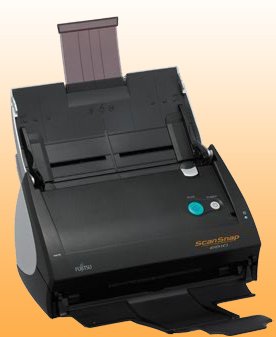
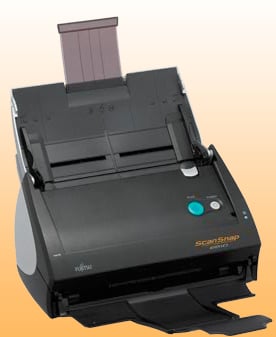
While there are a number of ADF scanners on the market, I love my Fujitsu ScanSnap. It’s a document scanner, which means it pulls sheets of paper through it, as opposed to a flatbed scanner on which you place one page at a time. I actually have two ScanSnaps — the 500M and the 300M. The larger one is still small enough to travel with (in a pinch), but the 300M is tiny in comparison and easily fits into my luggage. (Note that these models are for the Mac OS. More on Windows models in just a minute.) Either one is cool-looking enough to sit on my desk full time, and both are reasonably priced: from $259 to $401.
The Fujitsu ScanSnap
Small Yet Mighty
The 500 is no longer available; it was replaced by the ScanSnap 510M. The 510M scans 18 sheets of paper per minute… double-sided. That’s 36 pages per minute — faster than most duplex laser printers can spit out pages. The smaller 300M scans just 8 sheets per minute, but its slower speed is balanced by an even cooler trick: It’s only 3.1 pounds and can run on USB power, so you can use it in your car. (Not while you’re driving, please.)
You can install the software from CD, plug in the scanner, and be ready to go in about five minutes. Place a small stack of papers in the scanner, press the Scan button on the scanner’s front panel, and a minute later you have a PDF file.
Scanner manufacturers often forget that the software is as important (if not more so) than the scanner. Not so with Fujitsu. The ScanSnap Manager software stays out of your way when you don’t need it, yet it’s also easy to configure to. To customize the scanner’s behavior, open the ScanSnap Manager’s Preferences dialog box. You can make a wide range of adjustments, including the following:
- Single- vs. double-sided scanning
- Automatic detection of blank pages (to leave those out of the PDF), so you can easily mix double-sided and single-sided pages
- Naming conventions for the final PDF files
- Whether it should detect multiple page sizes (so you can scan business cards and magazine pages in the same batch)
- Quality of the scan and image compression
You can configure the software to save directly to a PDF file or to process the files with some other software. For example, the 510M comes with both Adobe Acrobat 8 Professional and the ABBYY FineReader OCR (optical character recognition) software to convert the scan into a text that you can place in a editable document, a database, or a spreadsheet. The 300M ships with Cardiris business card OCR software, which lets you convert people’s business cards into Address Book (or other contact managers).
Hey Fujitsu: It’s a Dual-Platform World
While I’m glad Fujitsu is so supportive of the Mac OS, I am somewhat frustrated that there are separate models for Mac OS and Windows. Many folks live in a dual-platform world now, and we should be able to use one scanner on either machine. However, while there are rumors of hacks that enable the Windows scanner to run on the Mac, it’s probably better to buy the model appropriate for the system you’re using.
Snazzy ScanSnap
Every now and again a gadget comes along that is just fun to show off to everyone around you — and virtually everyone who sees it immediately finds a use for it in their own lives. The ScanSnap falls into that category. It sounds kind of boring (“A document scanner? Yawn.”) but each time I bring it to a conference to scan the thousands of surveys attendees hand in, people are amazed. I often get an email a week later from an attendee saying, “I went right out and bought one.”
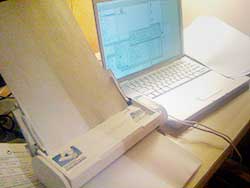
One of my ScanSnaps in situ.
Everyone — yes, even creative pros! — wants to organize their lives, but it’s rare to find a tool that can help make that a reality so easily. Fujitsu’s Web site offers video and Flash demos of the scanner; it’s worth taking a quick look to see if the Fujitsu ScanSnap is for you.
This article was last modified on December 17, 2022
This article was first published on July 2, 2008
Commenting is easier and faster when you're logged in!

Recommended for you

Damn You, Art School
It takes more than a good education to succeed in a any field. It takes real-wor...

Making a Die Cut Shape in InDesign
Need to cut a hole in (or apply a spot varnish to or emboss) your InDesign docum...

TypeTalk: An Interview with Ray Nichols of Lead Graffiti Letterpress
Ray Nichols is a man who follows his passion. Ray, along with his wife and partn...