



TypeTalk is a regular blog on typography. Post your questions and comments by clicking on the Comments icon above. If Ilene answers your question in the blog, you’ll receive one Official Creativepro.com T-Shirt!
Q. How can I disable auto-numbering in Microsoft Word? I’ve looked in Preferences as well as the Bullets and Numbering palette but can’t find the option.
A. Automatic formatting in Word is on by default. While it’s intended to help organize your work automatically, it can be frustrating when you want to turn it off and don’t know where to look.
The solution is in the menu bar under Tools > Auto Correct > AutoFormat as You Type. Under the heading Apply as you type, deselect Automatic numbered lists (Figure 1).
Figure 1. You can easily turn Microsoft Word’s AutoFormatting features on and off via Tools > AutoCorrect.
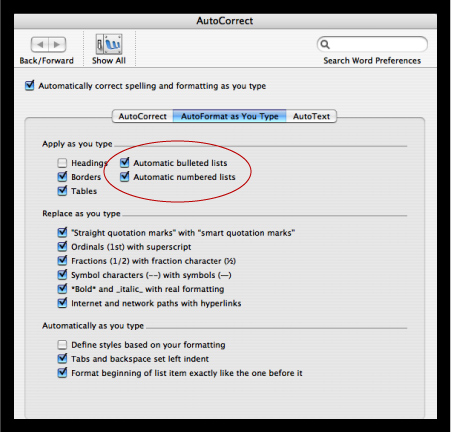
While you’re there, see if there are other options you might want to turn on or off, such as automatic bullets and hyperlinking URLs.
Love type? Want to know more? Ilene Strizver conducts her acclaimed Gourmet Typography workshops internationally. For more information on attending one or bringing it to your company, organization, or school, go to her site, call The Type Studio at 203-227-5929, or email Ilene at in**@***********io.com. Sign up for her e-newsletter at www.thetypestudio.com.
This article was last modified on January 8, 2022
This article was first published on August 21, 2008
Commenting is easier and faster when you're logged in!

Recommended for you

TypeTalk: Vertical Alignment
TypeTalk is a regular blog on typography. Post your questions and comments by cl...
TypeTalk: Ten Commandments of Type
What better time than January to make typographic resolutions? Adhering to the t...
TypeTalk: A Blizzard of White-Space Characters
Q. I understand nonbreaking spaces after reading your post last week about them,...