





TypeTalk is a regular blog on typography. Post your questions and comments by clicking on the Comments icon above. If Ilene answers your question in the blog, you’ll receive one Official Creativepro.com T-Shirt!
Q. Is there an easy way to get to all of the typographic features in a font, especially OpenType fonts, which can have so many characters?
A. Yes, there is. The glyph palette in most design programs is a map of the complete character compliment of each font. It shows you what’s in the font and lets you insert any character in your document with a single click. The glyph palette comes in handy when you’re looking for a standard character that you don’t use much, such as a register mark, accented character, or a Euro. But for fonts that have hundreds, if not thousands of characters, even the glyph palette can be a time-consuming exercise in frustration.
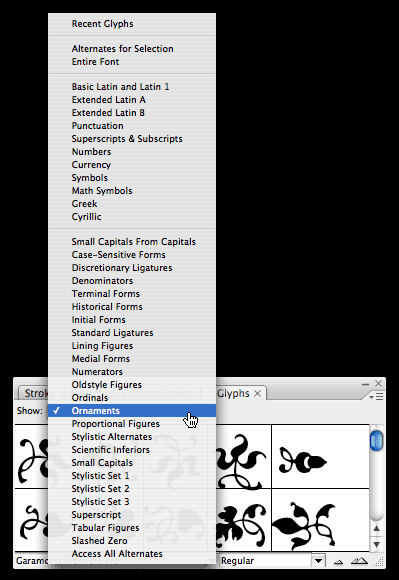
Here’s the trick: Use the glyph palette’s pull-down menu to view subsets of the complete character. Depending on what’s in each font, subsets will include categories of typographic features, such as punctuation, currency, and numbers, as well as discretionary ligatures, contextual alternates, swashes, small caps, ornaments, and a lot more.
Figure 1. Adobe Garamond Premiere Pro contains ornaments that you can view from the glyph palette subset entitled “Ornaments.” As you can see, many other character subsets are also accessible from this pull-down menu.
Love type? Want to know more? Ilene Strizver conducts her acclaimed Gourmet Typography workshops internationally. For more information on attending one or bringing it to your company, organization, or school, go to her site, call The Type Studio at 203-227-5929, or email Ilene at in**@***********io.com. Sign up for her e-newsletter at www.thetypestudio.com.
This article was last modified on May 15, 2023
This article was first published on September 24, 2008
Commenting is easier and faster when you're logged in!

Recommended for you

Marcel’s Letters: A Font and the Search for One Man’s Fate
Marcel is more than just a beautiful script typeface. It is the product of a fan...

From the Editor: A Free Font Manifesto
Hey folks- Your faithful Editor-in-Chief here, checking in with a little behind-...
Scanning Around With Gene: How Does Your Garden Grow?
This look at look at the Smithsonian collection of seed catalogs offers some gre...