


Hot Stuff

Win Suitcase Fusion 4 from Extensis!
Enter now to win!
TypeTalk: Where Did that Font Come From?!
You open one of your InDesign documents and see the Missing Font alert -- for a font you never use. What's going on? And more importantly, how do you stop it from happening ever again?
Written by Ilene Strizver on April 1, 2009
Related Articles
TypeTalk is a regular blog on typography. Post your questions and comments by clicking on the Comments icon above. If Ilene answers your question in the blog, you'll receive one Official Creativepro.com T-Shirt!
Q. When I reopen a document in InDesign, I get a missing font alert that says that the Times (TT) font is missing and a substitute font will be used. I don’t even use Times, so why is this happening?
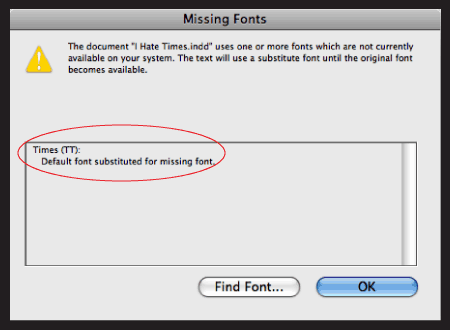
A. This annoying problem has an easy fix. Even if you never use style sheets, therein lies the problem: The [Basic Paragraph] style attributes contain the default for a document, which can somehow sneak into a document, if only for a space. That space, although invisible, contains a font style nonetheless.
The pesky missing Times (TT) as it appears in InDesign’s Missing Font dialog box.
To eliminate this problem, you have to change this default for the document in question, and for all future documents.
Here’s how:
1. In InDesign, go to Type > Paragraph Styles.
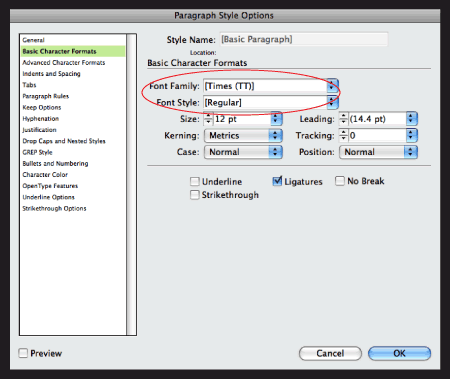
2. This opens the Paragraph Style Options dialog box. Select and click on Basic Character Formats from the menu on the left.
3. Change the default Font Family from [Times (TT)] to a default on your system, such as Arial.
When you follow these steps with a document open, it will affect only that document. If you follow these steps with InDesign active but no document open, you will affect all future new documents.
The fix is to change the missing font under Basic Character Formats in the Paragraph Styles Option dialog box to one that is on your system, as shown below.
Theoretically, you should be able to change the default font via InDesign's Character Palette, but in my experience, the style sheet method is a more reliable way to avoid the nasty missing Times (TT) alert.
Love type? Want to know more? Ilene Strizver conducts her acclaimed Gourmet Typography workshops internationally. For more information on attending one or bringing it to your company, organization, or school, go to her site, call The Type Studio at 203-227-5929, or email Ilene at info@thetypestudio.com. Sign up for her e-newsletter at www.thetypestudio.com.


INDD - Times
Thanks so much.
I run into this problem
I run into this problem fairly frequently, but in my experience it usually isn't a wayward character. If you have a frame that you accidentally turn into a text box, it will assign your default font to the frame. The font will be listed in the Find Font dialog box but it won't let you change the font (unless there are actual characters typed in your frame). If you encounter a situation like this, I've found that the easiest way to fix the problem is to select all of your frames and go to Object > Content and change them all to graphic. If the font is still listed, keep searching - It's out there somewhere.
sesli sohbet sesli chat
RE: Getting Rid of Times (TT) Missing Font Default
That method only works for new documents create after changing the default, which has to be done with no documents open. For existing documents, you have to manually change the missing font to any one on your system.
.. .. .. .. .. .. .. .. .. .. .. .. .. ..
T H E T Y P E S T U D I O
Westport, CT
203.227.5929
www.thetypestudio.com/
Getting Rid of Times (TT) Missing Font Default
Hi Ilene.
I was very excited to solve this irritating problem once & for all... but it didn't work! Any advice?
Getting Rid of Times (TT) Missing Font Default
Hi Ilene.
I was very excited to solve this irritating problem once & for all... but it didn't work! Any advice?
use plug-ins
You can also use font auto-activation plug-ins that will automatically load the selected font from your font manager as it is required.
I also highly recommend using the "Package" feature in InDesign to collect all of the fonts in use when you're sending it off to another user/for print.
Jim Kidwell
Extensis
MIssing Fonts
Thanks for this solution on the Missing Fonts. I have another problem. I've done a document and then the next time I open the same document, I get a dialog box that says I am missing the font, and I know the font is in my system. Why would I get a "missing font' message?
Great tip
I love simple tips like this that can make such a big difference in your workflow. Nice job.
The problem with defaults . . .
is that they only apply to NEW documents that are created after the default was changed. This might be fine for some. But in publishing, most documents are created from templates, so the defaults have no impact on them. There really needs to be a way to make InDesign apply defaults (with confirmation, of course) to every document that is opened after the defaults are changed.
Another possibility...
I run into this problem fairly frequently, but in my experience it usually isn't a wayward character. If you have a frame that you accidentally turn into a text box, it will assign your default font to the frame. The font will be listed in the Find Font dialog box but it won't let you change the font (unless there are actual characters typed in your frame). If you encounter a situation like this, I've found that the easiest way to fix the problem is to select all of your frames and go to Object > Content and change them all to graphic. If the font is still listed, keep searching - It's out there somewhere.
The other, more efficient solution is to just change your default font to something that will work in your workflow. Then this problem will be a non-issue.
Mysteriou missing fonts.
Quick and simple. Thanks

