




If you’re more familiar with digital photography than film photography, you may not know about grain: visible clumps of silver halide crystals on a piece of film. Different film stocks have their own characteristic clumping that varies in amount and pattern. If you want to stay in the digital realm but still want the look of specific film stocks, two Photoshop plug-ins, Alien Skin Exposure 2 ($249) and Imagenomic’s Real Grain ($99.95), provide easy-to-use tools that let you mimic the tone, color, detail, and grain qualities of particular film stocks.
For people with experience choosing particular film stocks to achieve certain looks, the presets provided by both of these products give you a quick way to exploit your film background. But even if you’ve never shot film, these plug-ins are handy for black and white shooting, since they provide high-quality automatic black and white conversions.
Both plug-is have their strengths and weaknesses, and which one — if either — is right for you depends on what types of images you like to shoot and how much you’re willing to spend on a plug-in.
Alien Skin Exposure 2.0
Rating: 85
On the Mac, the Leopard-ready Exposure 2 is compatible with Adobe Photoshop CS2 or later, Adobe Photoshop Elements 4.0.1 or later, and Adobe Fireworks CS3. On Windows (XP or later), there’s also support for Corel Paint Shop Pro Photo XI.
To use Exposure, open the image you want to process in Photoshop, then choose Filter > Alien Skin Exposure 2. There are two Exposure filters: one simulates black and white film, and another simulates color film.
The Exposure interface is in a single window that provides a big, zoomable preview of your image, and a tabbed panel containing sliders and other controls (Figure 1).

Figure 1. Exposure 2’s interface provides a large preview, and tabbed controls. Click on the image for a larger version.
Exposure’s Settings tab shows a collection of presets. For most users, these will probably suffice, thanks to the extensive selection of presets that ship with Exposure. For both black and white and color, Alien Skin has provided presets for all of the most popular film types.
So, for example, for black and white there’s Agfa APX 100, Agfa Scala 200, Fuji Neopan 100, Fuji Neopan 1600, Ilford Delta 100, Ilford Delta 3200, Ilford HPS Plus 400, Kodak Plus-X 125, Kodak T-Max 100, Kodak T-Max P3200, Kodak Tri-X 400, and Tri-X 400 pushed either 1 or 2 stops (Figure 2).
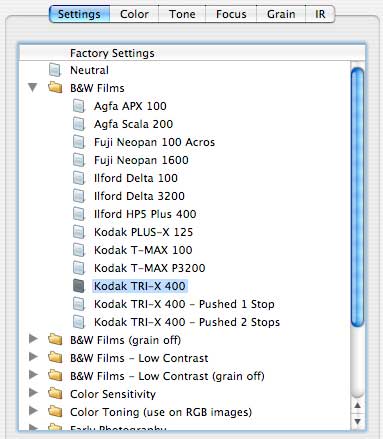
Figure 2: Exposure’s black and white presets.
Click any of these presets, and Exposure generates a preview that shows you what your image would look like processed with those settings. A toggle switch lets you switch between the processed and unprocessed images, and a pop-up menu lets you split the image to see one part of it processed, and the other left alone.
Clicking OK processes your image, but Alien Skin has been smart about how Exposure apply its effects. It first duplicates your original layer and applies the filter to that duplicate, so you can easily undo the effect by hiding or deleting the processed layer. Thanks to this architecture, the Exposure plug-in is a non-destructive edit. Exposure even names the new layer after your chosen preset, making it easy to see exactly what effect you’ve applied to what layer — a really nice touch.
Alien Skin has done an excellent job of mimicking film types (Figure 3). I showed a selection of images printed with different presets to three very experienced darkroom technicians. They each were very impressed with Exposure’s tonal rendering and felt that Alien Skin had successfully captured the look of the specified film types.

Figure 3: From left to right, Exposure’s emulation of Ilford Delta 100, Kodak Plus-X 125, and Kodak Tri-X400. Click on the image for a larger version.
There are a lot of variables involved in developing and printing film, and a change in any one can result in a very different outcome. Since it’s possible to change a particular print’s appearance by altering temperature or agitation while developing, it’s difficult to define a single, conclusive “look” for a specific film type. But our esteemed jury agreed that Alien Skin did an excellent job of consistently achieving a look that was characteristic of each film type.
In addition to altering tone, Exposure also lets you adjust focus and grain. Exposure’s presets do a good job of achieving detail-altering focus shifts that are authentic for specific film types, but grain emulation is not so successful. While the program does add grain, on most presets the effects are very subtle. At first, I thought it might be because of the high-res images I was working with, but Exposure seems to scale its grain adjustments to image size, for shrinking an image before applying the filter did not produce more pronounced grain.
Also, the grain it does add doesn’t authentically change in distribution from highlight to shadow areas.
Exposure includes a second set of presets for both its black and white and color filters that allow you to apply specific film types without grain emulation. In most cases, this is a better way to go.
Exposure’s color filters are similarly effective, doing an excellent job of recreating the color characteristics of specific films. As with the black and white filters, grain simulation is not especially strong, so you may want to opt for the “no grain” option.
Exposure 2.0’s Manual Override
While Exposure’s presets do a great job of emulating specific film types, it’s not limited to that trick. Exposure can also convert color images to black and white, while its color tools allow you to create interesting color tonings and adjustments.
The tone adjustments consist primarily of a single tone curve that includes sliders beneath the curve, such as those in Adobe Photoshop Lightroom. If you’re working on an RGB image, you’ll see separate curves for each channel.
When you’re adjusting color images, the Color tab provides some unusual controls. Separate red, green, and blue saturation sliders let you control the intensity of those components in your image, while a Master Saturation slider lets you drain the color completely out of an image. You can then use the separate red, green, and blue tone curves in the Tone panel, plus the additional controls in the Color panel, to create a pleasing black and white image.
The Color control lets you apply a colored filter over your image to create an overall shift in color, and a Filter Density slider lets you manage how strongly the filter is applied (Figure 4).

Figure 4. Exposure’s Color controls include simple sliders for altering the color in an image.
A Cooling/Warming slider and the Overall Intensity slider let you adjust the overall strength of the effects you’ve applied.
The Sharpness tab includes basic Unsharp Mask controls, with a couple of extra features. A Sharpen Brightness Only checkbox lets you apply sharpening to only the Luminance channel, while Blurring controls give you an additional level of control for preventing oversharpening halos.
Finally, there’s the Grain tab, which gives you sliders for controlling grain size, roughness, color variation, and separate distribution sliders for shadow, midtone, and highlight areas. Once you’ve fine-tuned your grain, you can strengthen or weaken it with the Overall Grain Strength slider.
If you’re comfortable with curves, Exposure’s Tone controls can be a good way to work; however, they pale in comparison to Photoshop CS3’s built-in Black and White adjustment. But if you’re using an older version of Photoshop, Exposure’s options are definitely better than the Channel mixer in Photoshop CS and CS2.
In the end, Exposure’s controls don’t let you do anything you couldn’t do with Photoshop’s existing controls. The real value of the package is in the presets, which give you one-click access to specific film looks. The manual controls are a simpler way to get some color effects, but this plug-in is strongest when you use it to convert to specific film stocks.
Imagenomic RealGrain
Rating: 80
Like Exposure, Imagenomic’s RealGrain can automatically process your images to mimic the tone, color, grain, and sharpness characteristics of specific film stocks.
RealGrain’s controls are in a single plug-in with a dialog box similar to Exposure’s (Figure 5). A large preview provides split panel options and zoom controls, and there are also options for either faster or more accurate previews. When I’m tweaking and fiddling, I like the faster preview. By contrast (pun intended), Exposure’s previews take a while to generate, which can make for tedious work when experimenting with subtle changes.

Figure 5. RealGrain’s interface provides robust preview and configuration controls. Click on the image for a larger version.
RealGrain includes an assortment of black and white and color presets that’s similar to Exposure’s. And, like Exposure, these presets will be everything most people need.
My panel of darkroom experts also analyzed RealGrain output. While they liked it and felt that the black and white conversions were very good, they thought the Exposure conversions were a little more accurate overall. However, many of the tonal differences they spotted fell into the “splitting hairs” category, and they agreed that RealGrain does a good job of tonal emulation overall.

Figure 6. RealGrain’s emulation of Ilford Delta 100, Kodak Plus-X 125 and Kodak Tri-X 400. Click on theimage for a larger version.
Imagenomic has taken the product’s name to heart. RealGrain is aggressive in its grain emulation, and it includes a deeper level of grain control than does Exposure. In addition to intensity controls and sliders for controlling grain distribution in shadows, midtones, and highlights, RealGrain adds a pop-up for specifying the type of grain: 35mm, or a range of medium format grains. RealGrain’s grain is highly visible and while it has the right shape, our jury didn’t think it was especially authentic. The Grain controls provide an additional option that lets you switch from Film Grain to Digital Noise, which is a little less aggressive.
If you want to add some texture to your images, the defaults in RealGrain may be more than you bargained for. Unfortunately, there’s no overall strength slider like the one in Exposure, but you can dial down the individual sliders to try to minimize grain. RealGrain doesn’t ship with grain-free versions of its presets, as Exposure does.
The Tone controls are similar to Exposures. You use a curve to make tonal adjustments; however, you can’t manipulate the curve directly. Instead, you use a series of sliders.
Color controls are more limited than Exposure’s, offering hue, saturation, and brightness controls for reds, yellows, greens, cyans, blues, and magentas, as well as global Saturation and Hue sliders.
RealGrain includes a dedicated Black and White tab you use to apply a Color Lens Filter, which reproduces the effects of shooting black and white film through a colored filter.
RealGrain also includes toning commands that allow you to create sepia tones and other casts in your image, or to create split tones that look like traditional duotones.
In general, Exposure provides a little more color control than RealGrain. Its filter controls and global sliders give you a little more power, and it offers sharpening tools, all of which might explain why Exposure’s presets have a slight edge.
Which One Should You Buy?
As I mentioned earlier, neither of these plug-ins do things you can’t accomplish with Photoshop’s built-in tools. However, if you’re after a specific film look, both plug-ins are much easier to use than any of Photoshop’s tools. Even if you only want more control over black and white conversions, or you’re looking for additional color controls, these plug-ins give you some welcome new options.
Exposure gets the edge in terms of overall image quality, and I appreciate its extra controls and features. But if you’re looking for serious grain control and want to add a lot of texture to your images, RealGrain is the way to go.
Unfortunately, both of these products are overpriced, especially Exposure at $249. Even at $99, RealGrain is a little steep for a tool that you probably won’t use every day, and that doesn’t provide capabilities you can’t find in Photoshop. Before you commit to either, I suggest that you download the plug-ins — both have free demo versions — and decide whether they’re worth the expense.
This article was last modified on December 14, 2022
This article was first published on January 30, 2008
Commenting is easier and faster when you're logged in!

Recommended for you

Design How-To: Images that Break Boundaries
This story is taken from “Before & After” Magazine. Creativepro....

How an Accordion Controls Photoshop’s Levels Command
The following is an excerpt from Speaking Photoshop CC by Dave Bate. Reprinted,...

Inside the Publishing Revolution: How the LaserWriter and Photoshop Changed the World
Excerpted from “Inside the Publishing Revolution: The Adobe Story” (...